Food Allergy Management That Stops the Tray, Not Just the Chart
Dietech holds each patient's food allergies, intolerances, dislikes, and never-serve items on their record, then enforces them where meals are actually chosen. Never-serve rules shape every patient's menu, allergies print on the tray ticket, changes raise a dashboard alert, and exposure can be reported across the census and the products you purchase.
Where an allergy actually gets caught
Recording an allergy is the easy part. The question that matters is how many places between the chart and the patient's mouth will notice it.
- 1
Allergies are recorded once
Food allergies, intolerances, dislikes, and adaptive equipment are held on the patient record. Where an EMR interface is in place, allergy changes arrive from the EMR rather than being retyped.
- 2
Counts stay visible
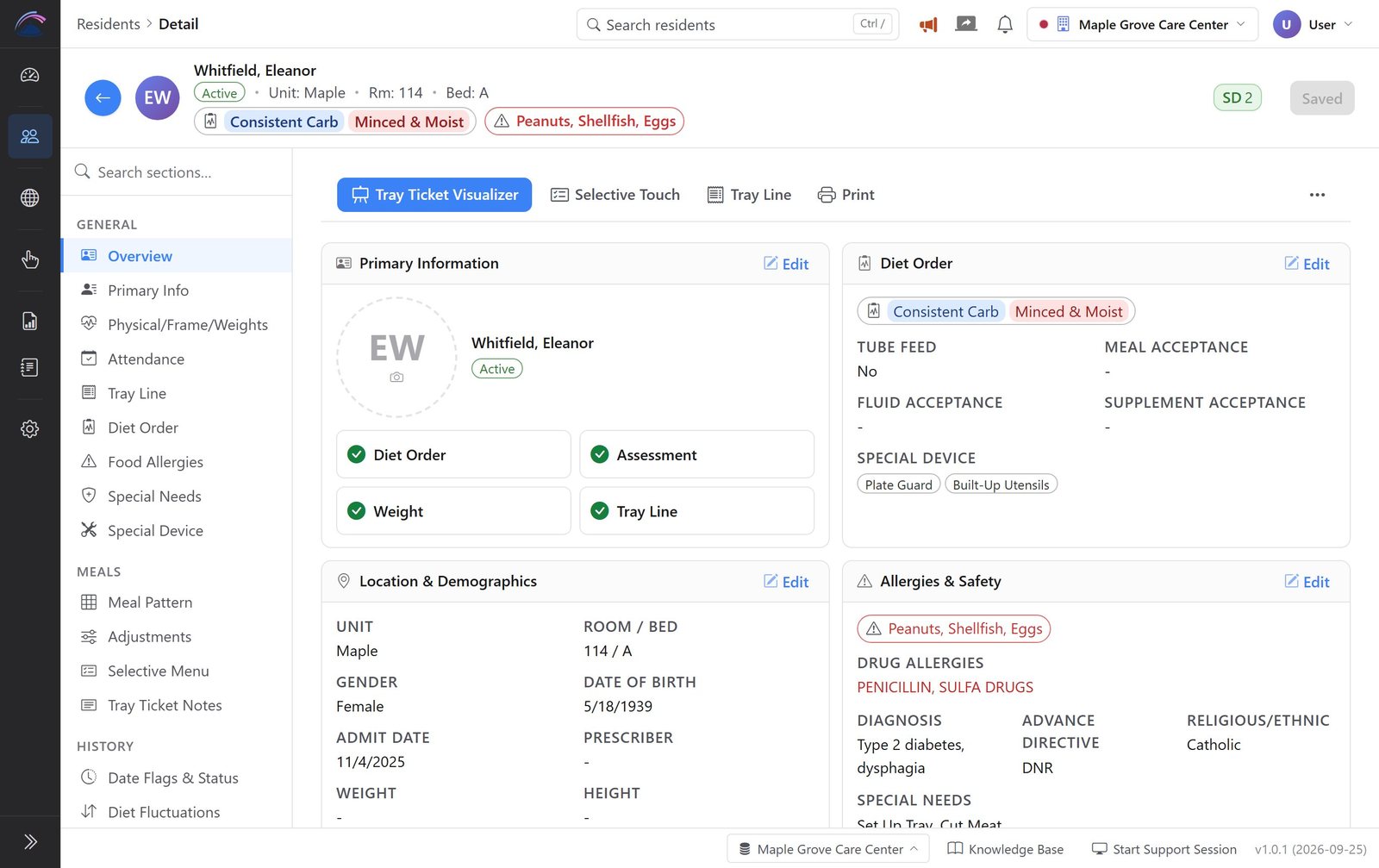
Every screen that shows a patient shows their food allergy, adaptive equipment, special needs, and notes counts as badges, so staff can see there is something to check before they open anything.
- 3
Allergies are built into the menu
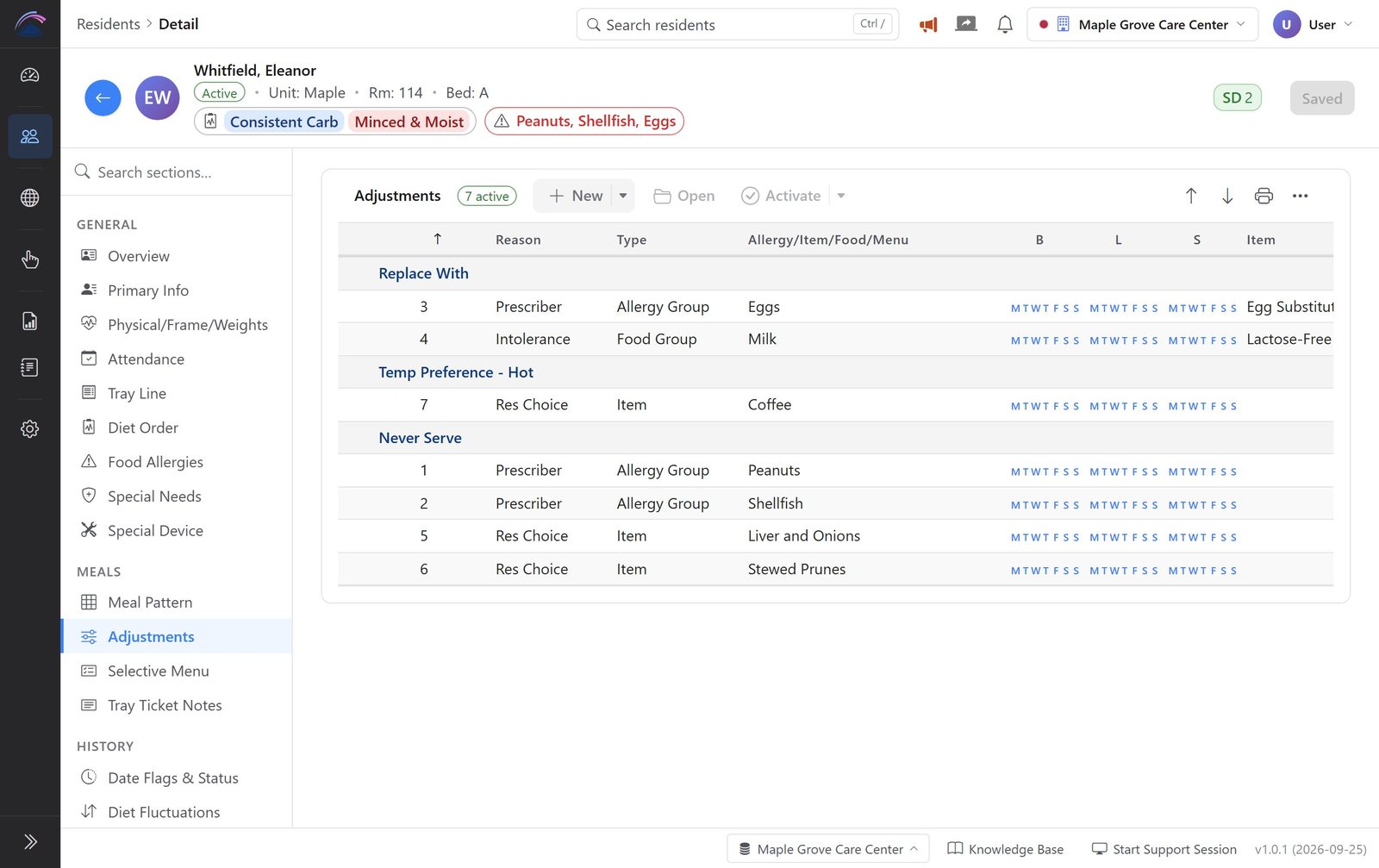
Each allergy, intolerance, or dislike is set as a Never Serve or Replace With adjustment on the patient's meal pattern, and Dietech applies it when it builds that patient's menu. If an allergy has no Never Serve adjustment covering it, the meal pattern shows a warning until the gap is closed.
- 4
Allergies print on the tray ticket
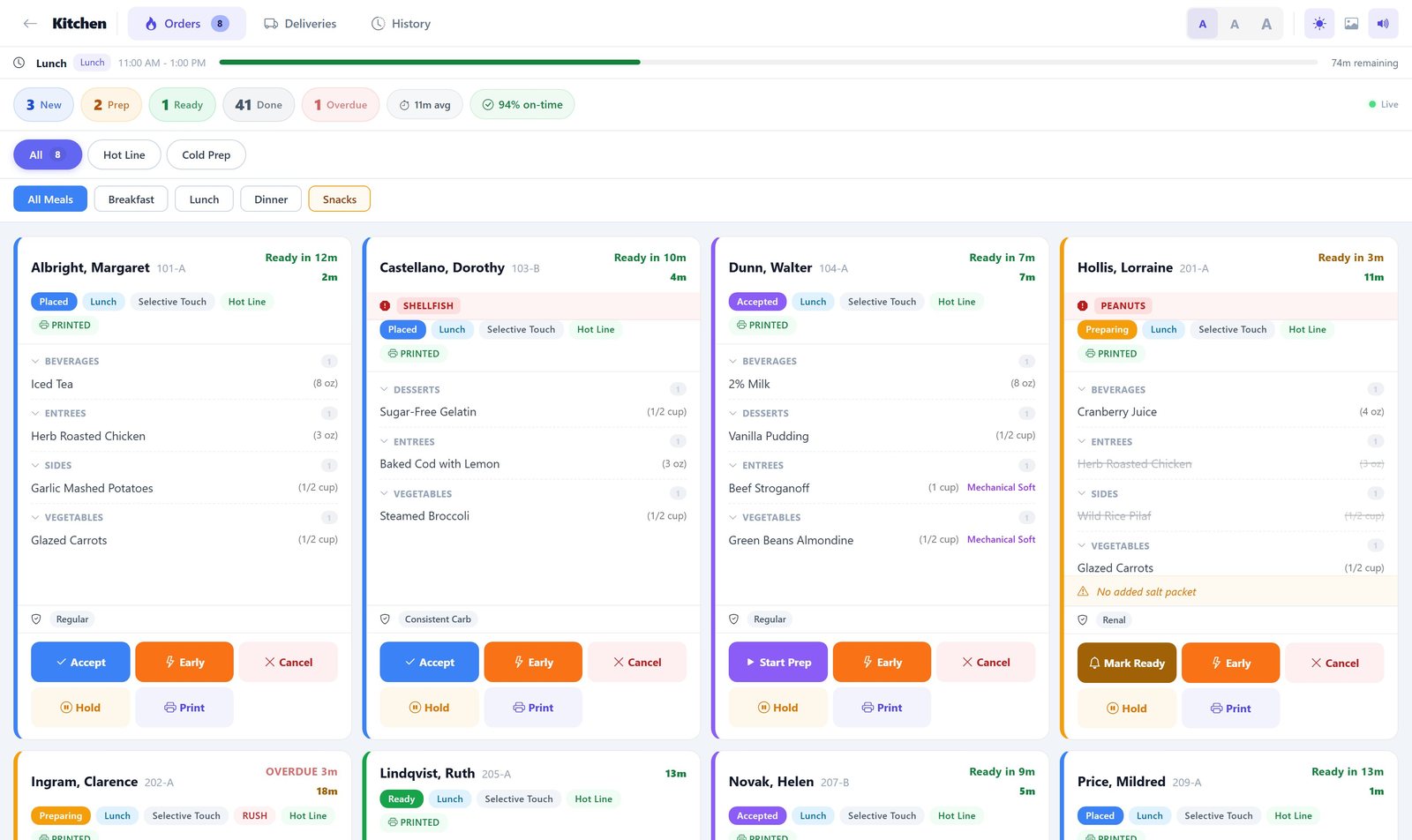
The allergy line prints on the ticket that travels with the tray, so the line and the runner both see it, not just the person who took the order.
- 5
Changes raise an alert
New and changed allergies surface on the dashboard so the dietary department sees them the day they happen rather than at the next chart review.
- 6
Exposure is auditable
The food allergy analysis report shows which patients carry which allergies across the facility, and allergen exposure reporting reaches through to the products actually purchased.
Allergies in the Dietech website
Real screens from Dietech, shown with sample residents and a sample menu.
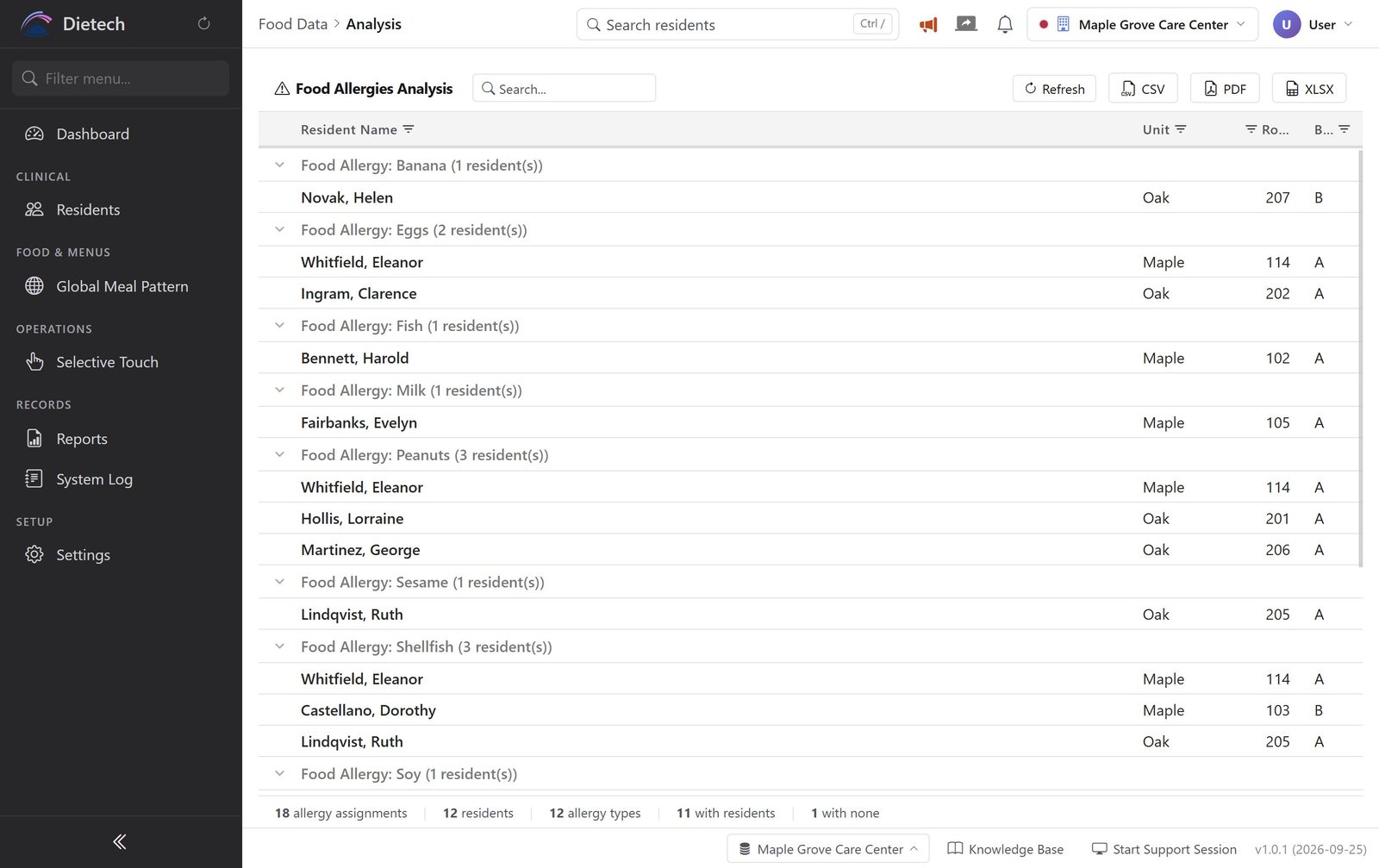
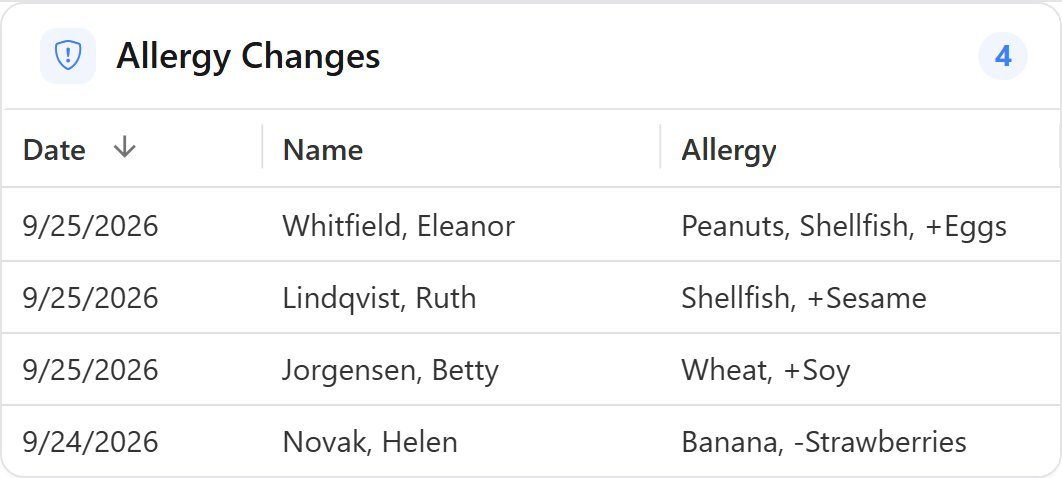
When an allergy is added or removed, the change shows on the dashboard the same day, so the kitchen is not the last to find out.
What allergen management covers
Held per patient, enforced at the point of order, and reportable across the facility.
| Capability | How it works |
|---|---|
| Allergy record | Food allergies held per patient, alongside intolerances, dislikes, adaptive equipment, and special needs |
| Never-serve items | Allergies, intolerances, and dislikes set as Never Serve or Replace With adjustments on the meal pattern and applied when each patient's menu is built. An allergy with no matching Never Serve adjustment raises a warning on the meal pattern |
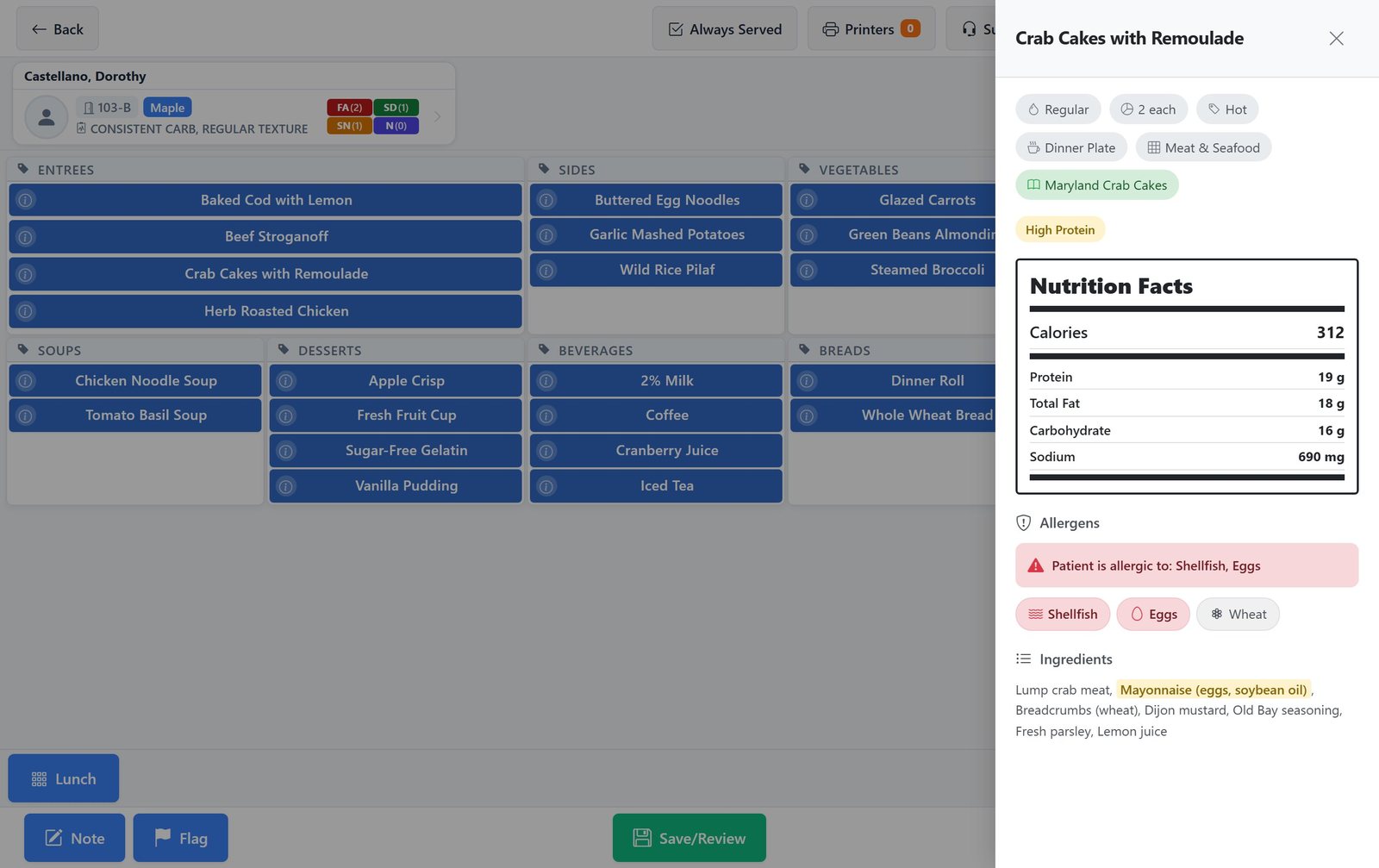
| Checks where orders are taken | In Selective Touch, an item's details check its allergens against the patient's record and flag conflicts in red. In patient self-order, items containing the patient's allergens are hidden, and an allergy check runs again before the order is confirmed |
| At-a-glance badges | Food allergy, adaptive equipment, special needs, and notes counts shown as coloured badges on the patient header |
| Tray ticket printing | Allergies print on the tray ticket that travels with the meal, together with texture, fluid consistency, and equipment notes |
| Dashboard alerts | Allergy changes appear as their own card on the dietary dashboard so new allergies are not missed |
| Facility-wide reporting | The food allergy analysis report lists allergies across the census for review, audit, and survey preparation |
| Supply-side exposure | Allergen exposure reporting in purchasing connects patient allergies to the products and recipes actually being bought |
| EMR-sourced allergies | Where an HL7 or FHIR interface is in place, allergy data flows from the EMR instead of being maintained twice |
Allergies are one restriction among several
A patient's plate is shaped by clinical orders, swallowing safety, belief, ethics, and preference at the same time. Dietech holds diet orders as configurable definitions, so these run side by side on one record rather than living in separate lists that staff have to cross-check.
| Restriction type | Examples in use |
|---|---|
| Food allergies | Individual allergens held per patient, applied to the patient's menu and printed on the tray ticket |
| Therapeutic diets | Heart healthy, 1800 CCHO and other carbohydrate-controlled diets, renal, high protein, GI soft, clear liquid |
| Texture and consistency | Easy to chew, soft and bite sized, minced and moist, pureed; thin, slightly thick and thicker fluid levels under IDDSI |
| Religious and cultural | A dedicated religious and ethnic field on the patient record, alongside kosher and similar diets held as diet orders in their own right, so belief-based requirements carry through ordering and production rather than sitting in a free-text note |
| Ethical and lifestyle | Vegan, vegetarian, pescatarian, gluten free, and similar patient-chosen patterns |
| Dislikes and never-serve | Preferences that are not clinical but still should not reach the tray, set to never serve or replaced with something the patient will eat |
| Nil by mouth | NPO flagged prominently on the patient so no tray is built while the order stands |
| Adaptive equipment | Plate guards, spill-proof cups, and similar needs recorded alongside the diet and printed with the meal |
Hospitals and long-term care
Allergies that arrive with the admission
- Allergy and diet order data received through HL7 or FHIR R4 interfaces
- Allergies print on the tray ticket verified at the bedside by wristband scan
- Room service and self-order both constrained by the allergy record
- Allergen exposure traceable through to purchased products
- Documentation retained for accreditation review
Allergies, dislikes, and adaptive equipment together
- Allergies, intolerances, dislikes, and adaptive equipment on one record
- Never Serve adjustments applied to every patient's menu
- Allergy changes surfaced on the dietary dashboard daily
- Facility-wide allergy report for state survey preparation
- Preferences tracked alongside allergies to reduce plate waste
Frequently asked questions
Allergies, intolerances, religious and cultural diets, never-serve items, and how each is enforced.
Does Dietech handle religious, vegan, and other cultural diets?
Yes. Diet orders in Dietech are configurable definitions rather than a fixed list, so kosher, vegan, vegetarian, pescatarian, gluten free and similar patterns are set up as diet orders in their own right. That matters practically: because they are real diet orders rather than notes on a record, they filter the menus a patient is offered, drive production counts, and print on the tray ticket exactly the way a therapeutic or texture-modified diet does. A patient can hold several at once, so a kosher patient on a carbohydrate-controlled diet needing minced and moist texture is a single coherent order rather than three things staff have to reconcile.
How does Dietech prevent a patient being served something they are allergic to?
Allergies are recorded on the patient record and turned into Never Serve or Replace With adjustments on the meal pattern, which Dietech applies when it builds the patient's menu. If an allergy is recorded without a Never Serve adjustment, the meal pattern warns about it. On the touchscreen, an item's details flag any conflict in red, and in patient self-order the conflicting items are hidden and checked again at confirmation. The allergy also prints on the tray ticket and shows on the kitchen display card, so the tray line and the runner see it independently of whoever took the order.
What is a never-serve item?
A never-serve item is a food a particular patient should not receive, whether because of an allergy or a strong dislike. It is set as a Never Serve adjustment on the patient's meal pattern, with a reason such as prescriber or resident choice, and Dietech applies it every time it builds that patient's menu. Where a substitute makes more sense, a Replace With adjustment swaps the item for one the patient can have.
Does Dietech distinguish allergies from intolerances and dislikes?
Yes. They are held separately, because they behave differently. An allergy is a clinical safety issue that belongs on the tray ticket and in the EMR. An intolerance may change what is served without being an emergency. A dislike is a preference that drives satisfaction and plate waste. Treating all three as one list is how facilities end up either over-warning staff or under-recording real allergies.
Can allergy information come from our EMR?
Yes, where an interface is in place. Dietech integrates with EMR systems including PointClickCare and MatrixCare, and supports HL7 messaging and FHIR R4. Allergy and diet order changes made in the EMR flow into Dietech rather than being entered a second time in the dietary department, which is where duplicate-entry errors usually originate.
Can we report on allergies across the whole facility?
Yes. The food allergy analysis report lists allergies across the census, which is what surveyors and dietitians typically want to see. Separately, allergen exposure reporting in the purchasing module connects those patient allergies to the products and recipes actually being purchased, so you can answer questions about what is coming through the back door as well as what is going out on trays.
How are allergies handled when a patient orders their own meal?
The same restrictions apply. Patient self-order only presents items compatible with the patient's diet order, hides items that contain the patient's allergens, and runs an allergy check again before the order is confirmed. Patients cannot order around their own allergy record.
Do staff see allergy information before they open the patient record?
Yes. Food allergy, adaptive equipment, special needs, and notes each show as a small badge with a count on the patient header, so staff can tell at a glance that there are three allergies to check without having to open anything first.
Related capabilities
Kitchen Display System
Live orders on the tray line, a delivery board, and two-scan patient ID verification at the bedside.
Patient Self-Order
Patients pick their own meals, constrained by their diet order and allergy record.
Mobile & Tablet
Run Dietech on iPad, Android tablets, phones, and kiosks without an app store install.
Walk through allergen handling on your own census
Bring a handful of real cases: a patient with multiple allergies, a difficult dislike, an adaptive equipment need. We will show you exactly where each one gets caught.