Touchscreen Menu Selection Built for Dining Rooms and Tray Lines
Selective Touch is Dietech's staff-facing ordering screen. It shows each patient's diet order and allergies, presents only the items that diet permits, totals nutrients live as selections are made, warns when a meal goes outside its limits, adds always-served standing items automatically, and routes the finished ticket to the right printer.
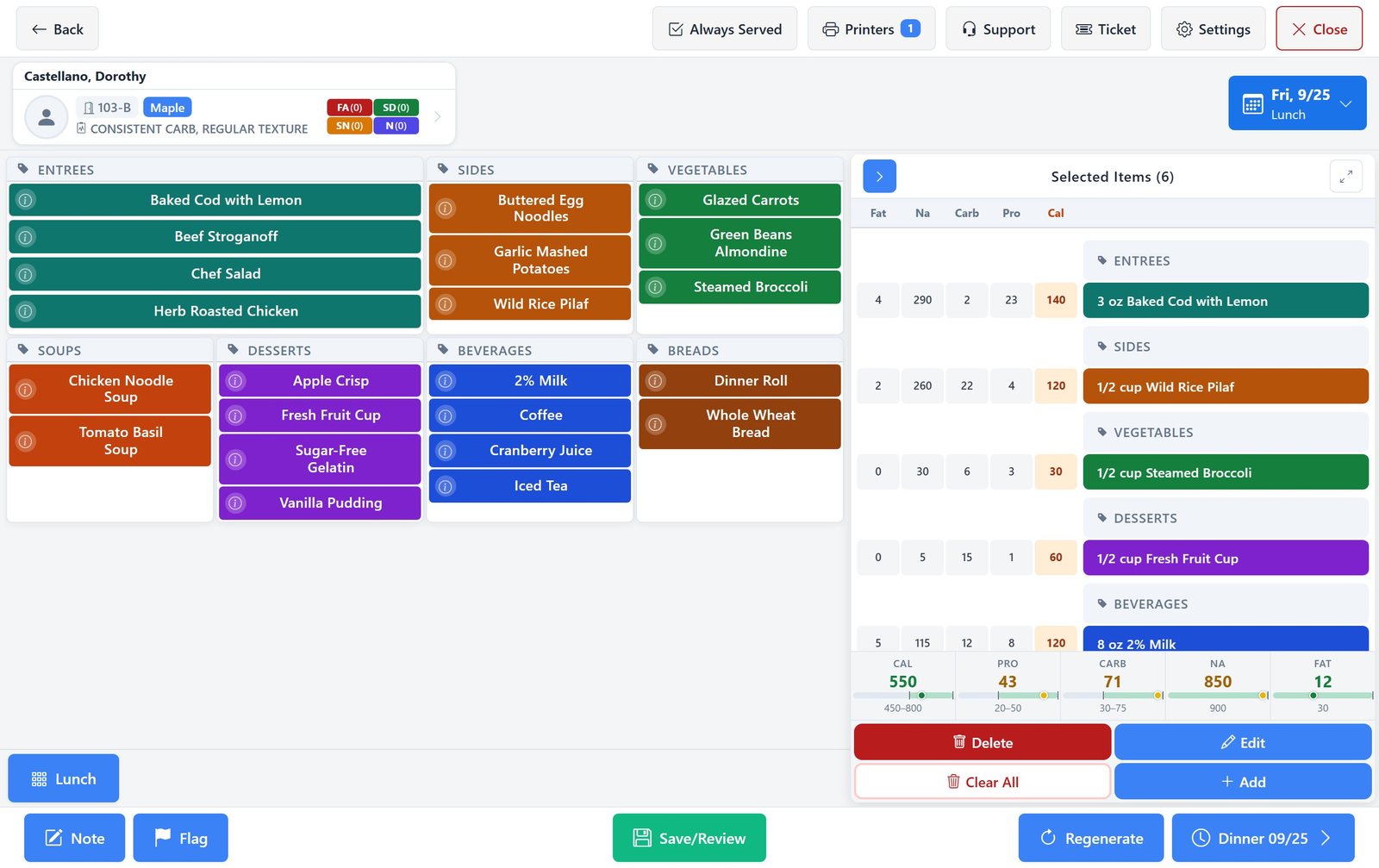
Selective Touch, screen by screen
Real screens from Dietech, shown with sample residents and a sample menu. It runs in the web browser on any tablet, laptop, or touchscreen.
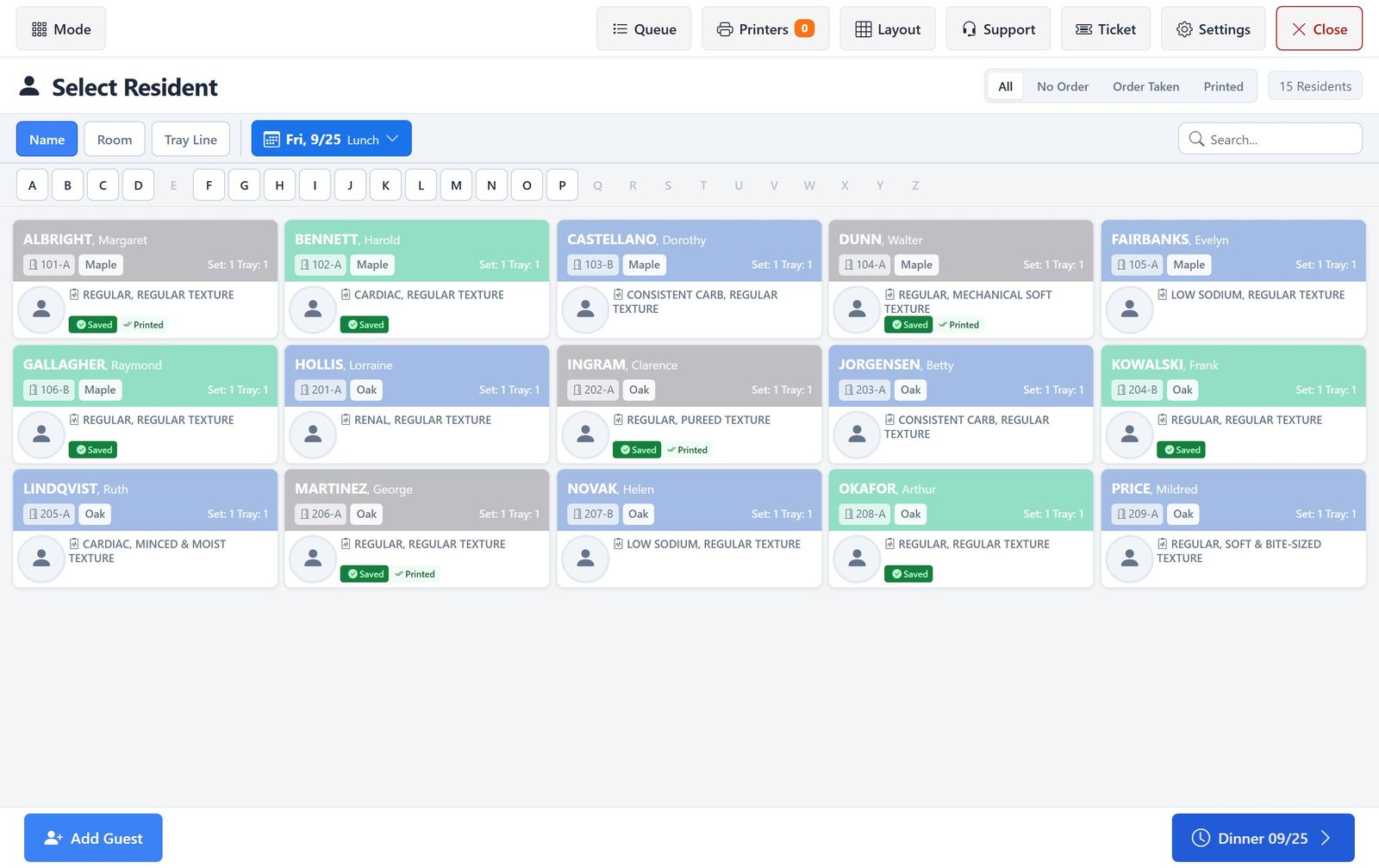
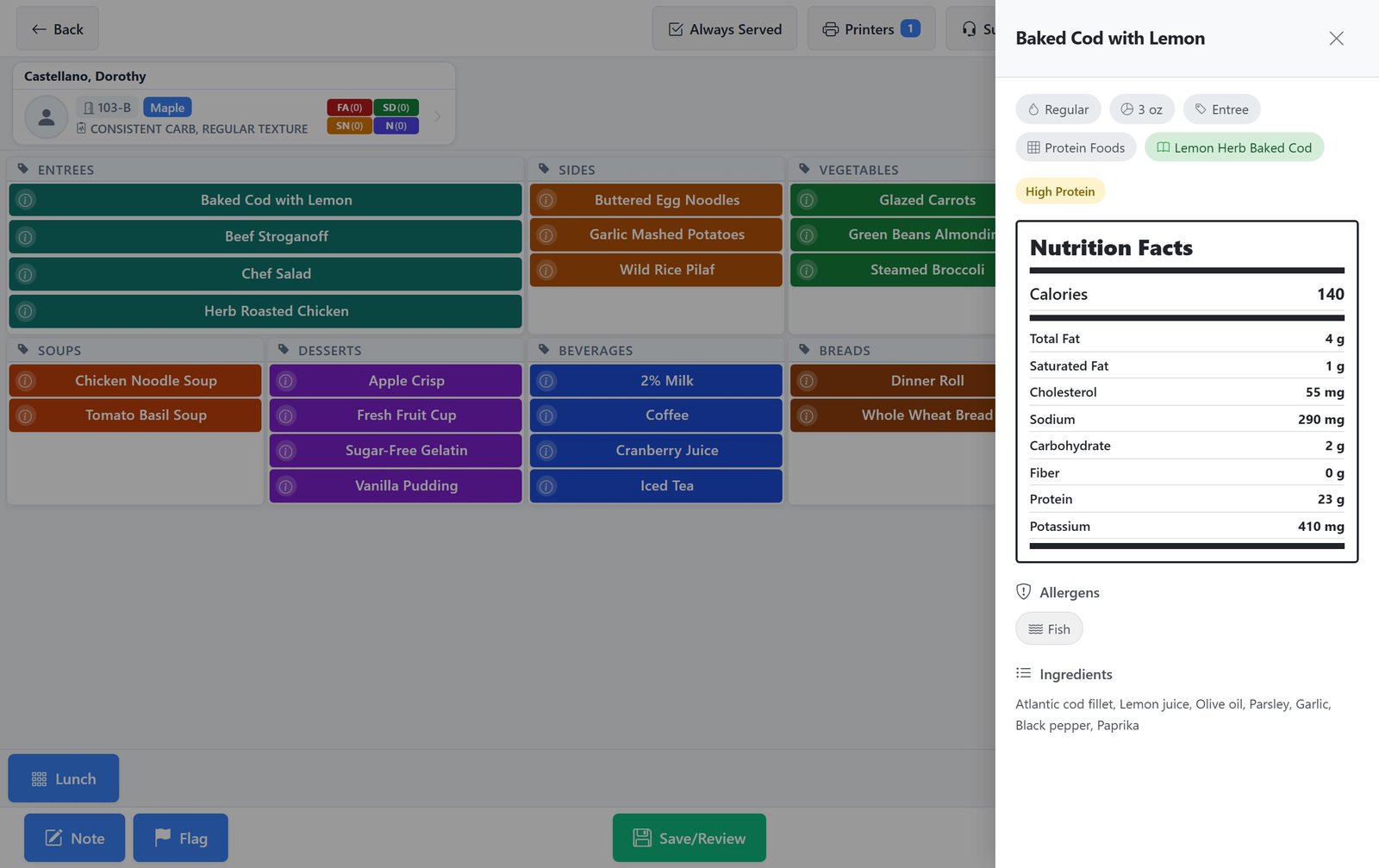
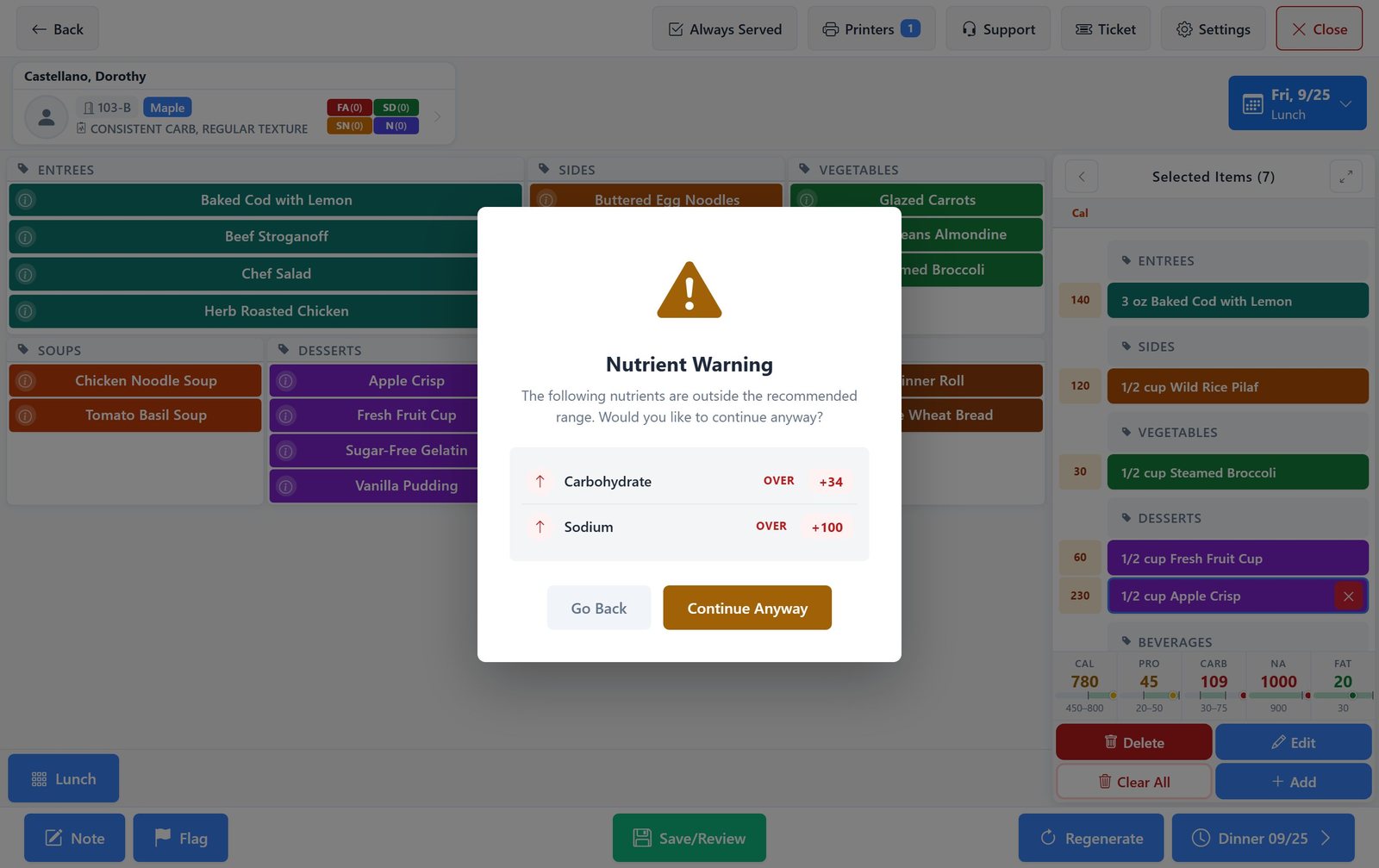
How an order is taken
Designed around how a dining room actually runs rather than around a database form.
- 1
Pick the meal and day
Staff select the service date and mealtime, and the menu cycle in use. Facilities running several menus (regular, selective, independent living, holiday) choose the one that applies.
- 2
Choose the patient or the seat
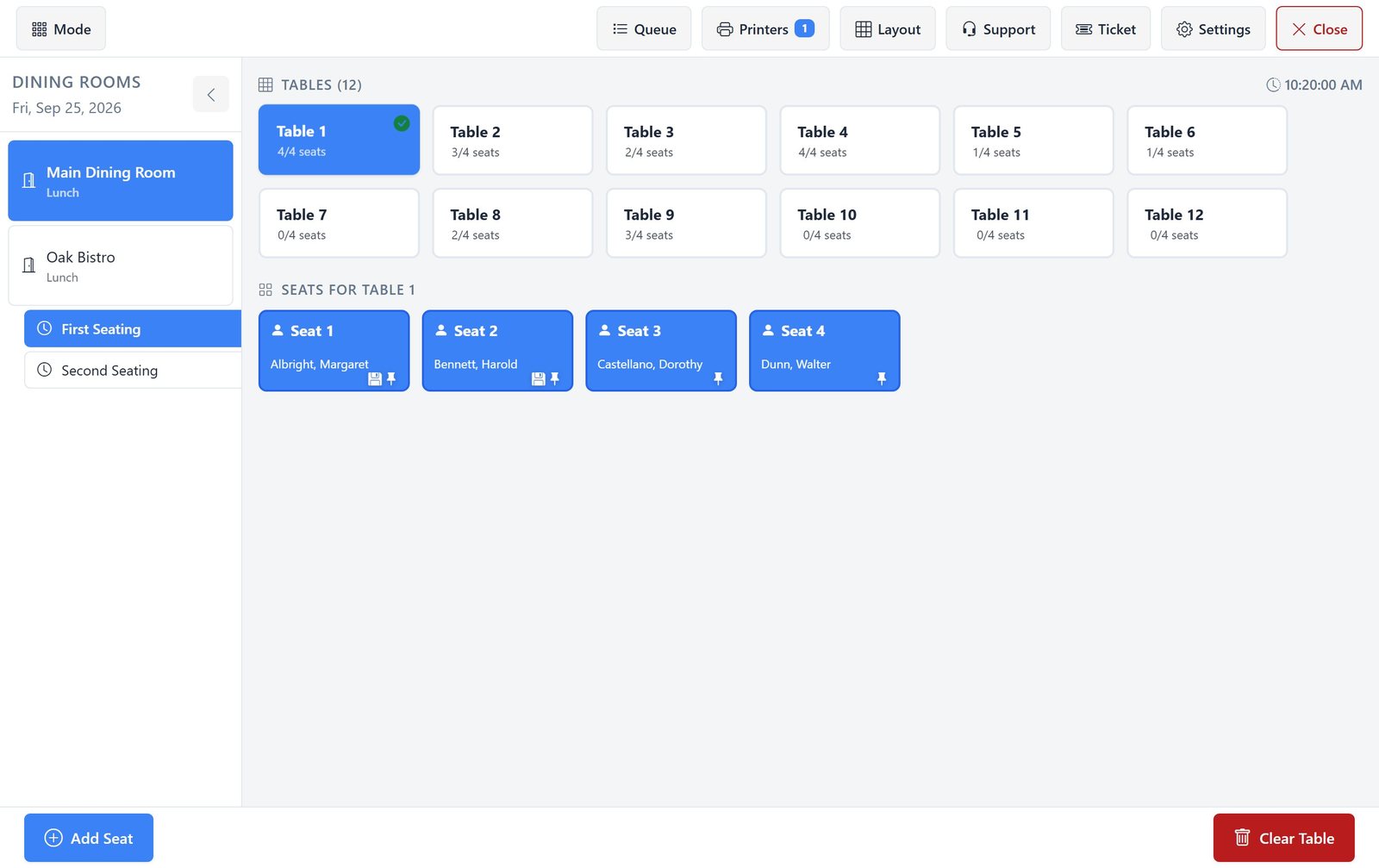
Orders can be taken from a patient list or from a table and seat layout, which is how most dining rooms actually work: you serve a table, not an alphabetical list.
- 3
The diet is already applied
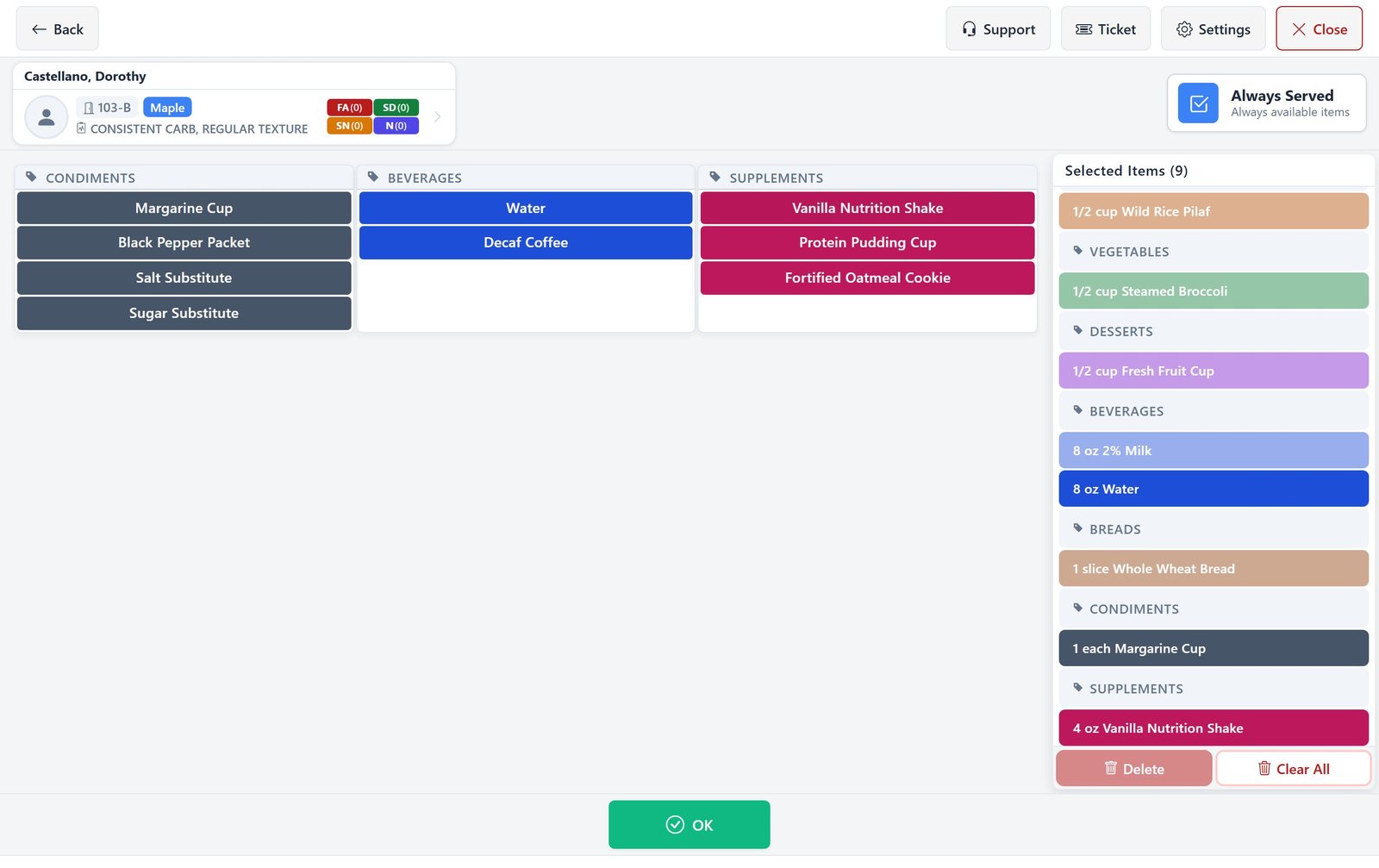
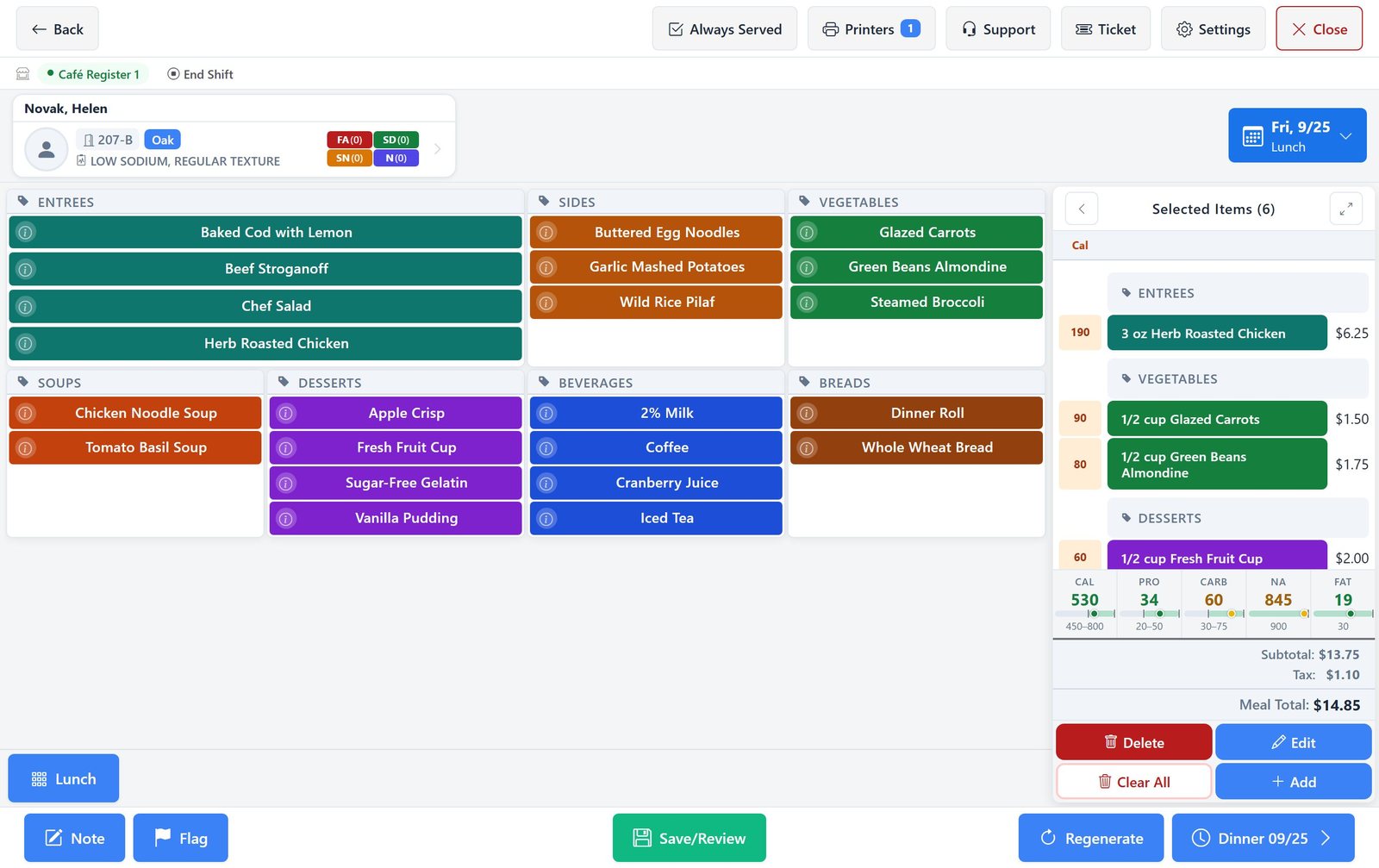
The patient header shows the diet order, texture, and fluid consistency, with allergy, adaptive equipment, special needs, and notes counts as badges. The menu is built to that diet before it is displayed.
- 4
Tap to select
Items are colour-coded tiles grouped by category, each showing its portion and any texture or thickening that applies. Tapping toggles the item; the order summary builds alongside in real time.
- 5
Limits are checked
Nutrient totals turn red the moment a selection pushes the meal outside the prescribed range, and a warning asks staff to go back or continue before the order is saved. Allergies and never-serve items are applied when the menu is built, and each item's details flag any conflict with the patient's allergies.
- 6
Review, print, and serve
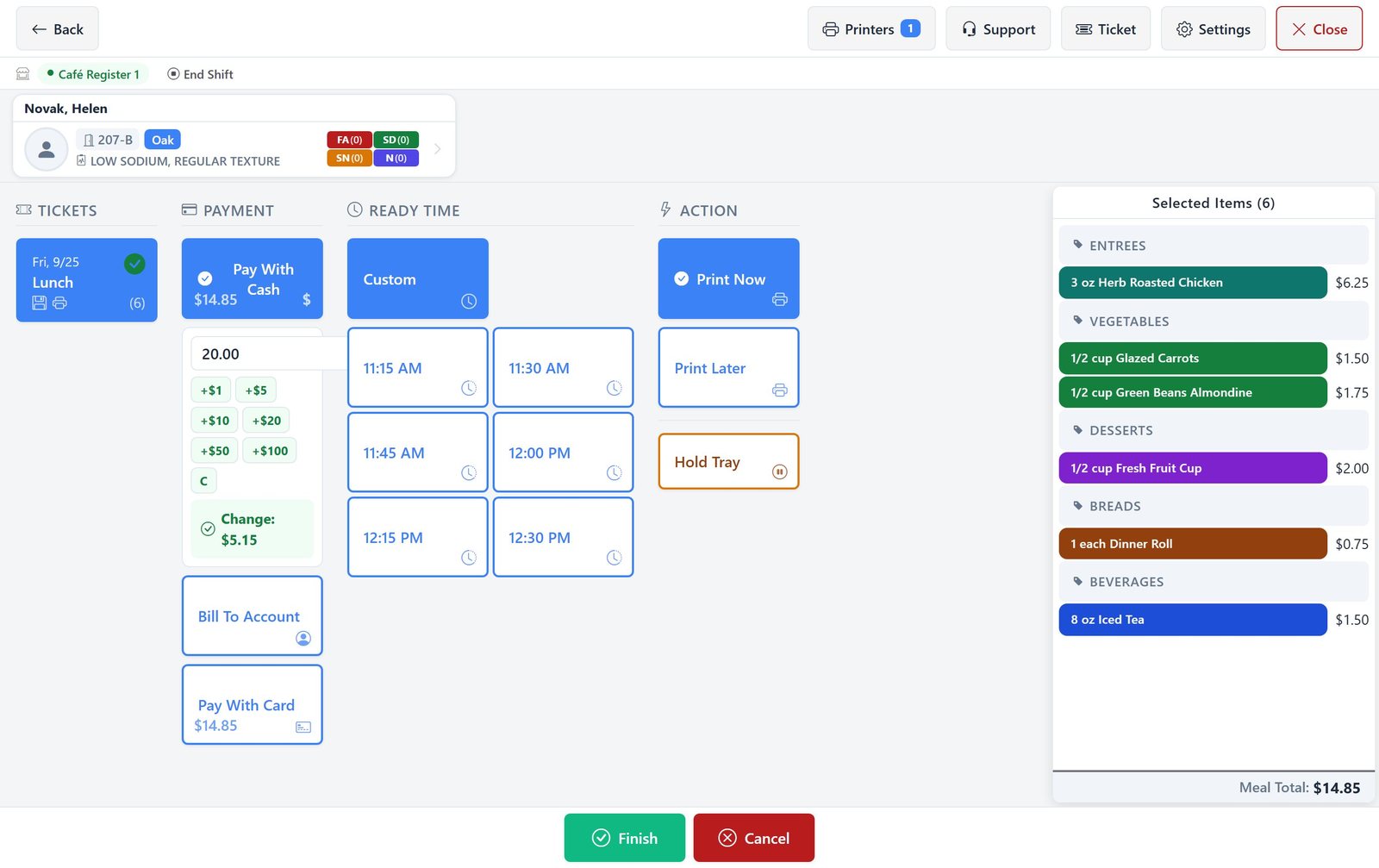
The order is reviewed in full, then routed to the correct printer or print queue for the tray line, with always-served items added automatically.
What Selective Touch includes
Menu selection, clinical safety checks, and point of sale on one screen.
| Capability | How it works |
|---|---|
| Touch-first interface | Large colour-coded tiles sized for gloved hands and dining room use, not a desktop grid adapted to touch |
| Diet-built menus | The menu is generated against the patient's diet order, texture modification, and fluid consistency before it is shown |
| Live nutrient meters | Nutrient totals build as items are selected, with a meter bar showing where the meal sits against the prescribed range |
| Nutrient warnings | Totals turn red as soon as the meal goes outside its nutritional limits, and a warning asks staff to go back or continue before the order is saved or the next meal is opened |
| Allergy & never-serve | Never Serve and Replace With adjustments are applied when the patient's menu is built, and each item's details flag any conflict with the patient's allergies in red |
| Always-served items | Standing items a patient always receives are added automatically rather than re-selected at every meal |
| Table & seat handling | Dining room orders taken by table and seat, matching how service actually runs |
| Menu cycle selection | Multiple menu cycles available at the point of order: regular, selective, independent, holiday, and seasonal |
| Item detail & modifiers | Item info, portion changes, added items, child items, and free-text notes on any selection |
| Point of sale | Meal rate totals, employee and guest sales, shift management, and payment handling for cafeteria service |
| Print routing | Named printers and a print queue so tickets reach the right station on the line |
Hospitals and long-term care
Tray line and cafeteria
- Selective menu ordering against EMR-sourced diet orders
- Cafeteria point of sale with employee and guest meal handling
- Shift management and meal rate totals
- Print routing to the correct tray line station
- Feeds the kitchen display and delivery board directly
Dining room service
- Orders taken by table and seat rather than alphabetically
- Always-served standing items applied automatically
- Never Serve adjustments for resident dislikes applied to every menu
- Multiple menu cycles including holiday and seasonal
- Live nutrient meters for residents on restricted intakes
Frequently asked questions
Touchscreen ordering, nutrient limits, table service, and point of sale.
What is Selective Touch?
Selective Touch is Dietech's touchscreen ordering screen. Staff use it to take selective menu orders in dining rooms, on tray lines, and at cafeteria points of sale. It shows the patient's diet order and allergies, presents only menu items compatible with that diet, builds nutrient totals live as items are chosen, and routes the finished ticket to the right printer.
How does Selective Touch stop a nutritionally inappropriate order?
Two ways. First, the menu itself is generated from the patient's diet order, texture requirement, and fluid consistency, so incompatible items are not offered. Second, nutrient totals accumulate live as items are selected and a meter bar shows where the meal sits against the prescribed range; if a selection pushes the meal outside its limits, the totals turn red at once and a warning stops the order before it is saved, rather than a report flagging it the next day.
Can it handle dining rooms organised by table rather than by resident?
Yes. Orders can be taken from a table and seat layout as well as from a patient list. This matters more than it sounds: dining room staff serve a table at a time, and software that only offers an alphabetical resident list forces them to work against the way the room actually operates.
What are always-served items?
Items a particular patient receives at every meal, such as a specific beverage, a condiment, or a supplement, added to the order automatically rather than being re-selected each time. They are managed in their own panel, so a standing preference is recorded once and then applied consistently.
Can Selective Touch handle cafeteria and employee sales?
Yes. It includes point-of-sale handling: meal rate totals, employee selection, guest meals, shift management, and payment. The same screen therefore covers patient meal selection and staff cafeteria service rather than requiring a separate till system.
What hardware does Selective Touch run on?
It runs in a browser on touchscreen terminals, all-in-one POS units, and tablets. Because Dietech runs in the web browser, the same screen works on a fixed dining room terminal and on a tablet carried between tables.
How is Selective Touch different from bedside ordering?
Selective Touch is staff-operated and built for volume: one member of staff working a dining room, a tray line, or a till, moving quickly between patients. Bedside ordering in eTableServ is patient-operated on a screen in the room. Facilities commonly run both, with the dining room on Selective Touch and rooms on bedside or self-order.
Related capabilities
Patient Self-Order
The patient-operated counterpart. Patients order for themselves from a link, within their diet order.
Allergen Management
The allergy, intolerance, and never-serve record applied to every patient's menu.
Kitchen Display System
Where the finished order lands: live tray line display, delivery board, and patient ID verification.
Try Selective Touch on your own menu cycle
Bring a menu cycle and a few real diet orders, and we will take live orders on the touchscreen so you can see how it behaves at dining room speed.