Every Tap Reaches the Kitchen
Selective Touch Online runs in any web browser on a tablet, laptop, or desktop. When staff save a resident's order, it appears on the kitchen display right away with the diet order, texture, and allergies on the card. Your menus, diets, and residents carry over, and tray tickets still print.
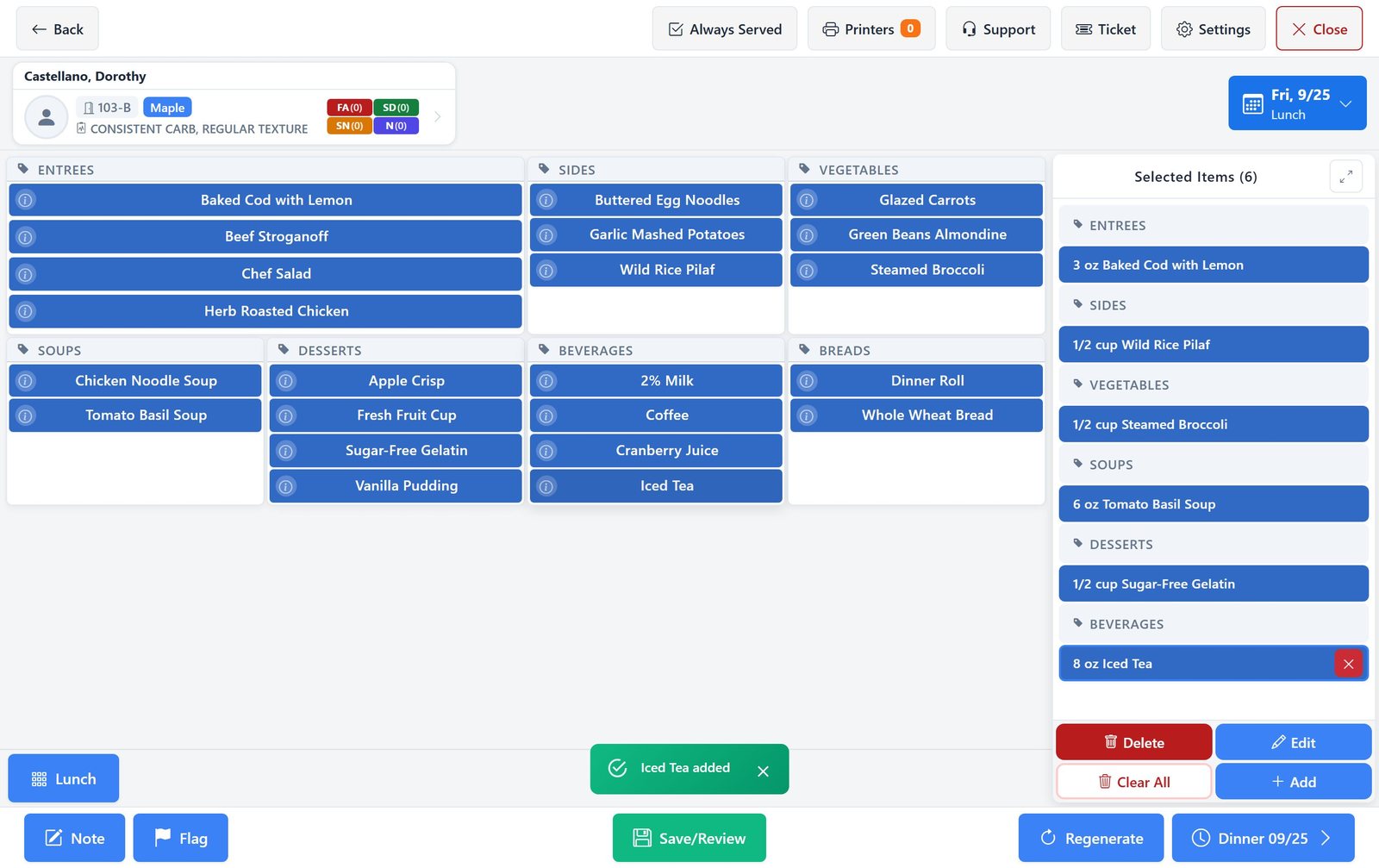
The reason to switch: the order and the kitchen see the same thing, at the same time
With the desktop version, an order is finished when a ticket prints. What happens after that lives on paper, and nobody can see at a glance which trays are waiting, which are late, or which one carries an allergy. Selective Touch Online closes that gap.
Desktop Selective Touch
- Sign in to a remote desktop
- Take the order
- Ticket prints
- Kitchen works from paper
Selective Touch Online
- Open a browser
- Take the order
- Kitchen display updates live
- Ticket prints
Built for fingers, not a mouse
Large tiles, one resident at a time, and nothing to install. It works on the tablets your staff already carry, in landscape or portrait.
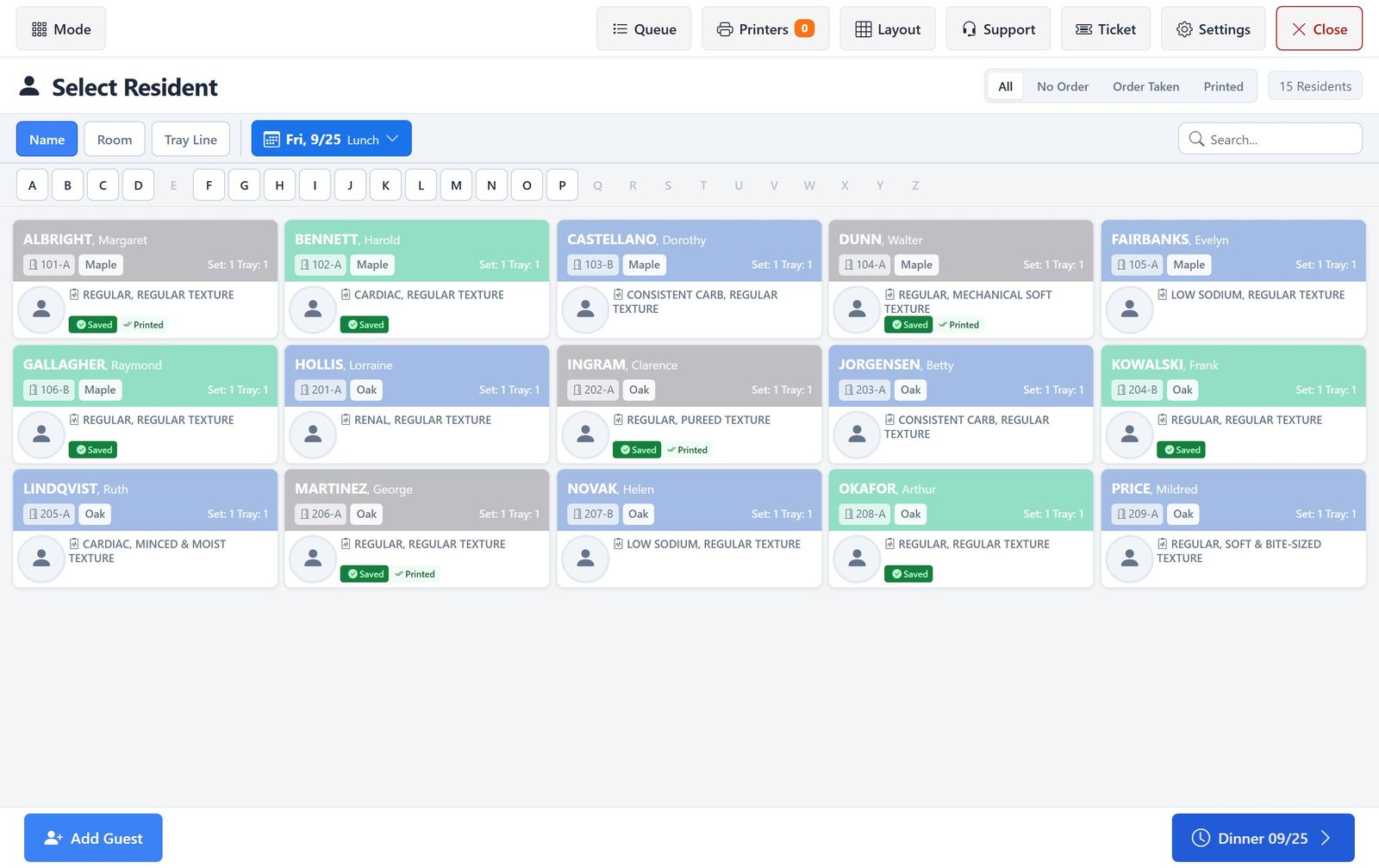
Find anyone fast
Sort by name, room, or tray line, jump by letter, or search. Filter to residents with no order, an order taken, or a ticket printed.
Diet and safety up front
Diet order, texture, food allergies, special devices, special needs, and notes sit in the resident header while you order.
Plan ahead
Move from breakfast to lunch to dinner without leaving the resident, and take orders for upcoming meals in one visit.
Your menu, your layout
Arrange category tiles for each meal the way your team works. Residents on restricted diets see a packed screen with no empty gaps.
Nutrition at a tap
The info button on any item shows its nutrients, so staff can answer a resident's question on the spot.
Guests and notes
Add a guest tray, attach a note or flag to the meal, and review everything before you save.
One tray, five stages, one screen
Every order saved in Selective Touch Online moves across the kitchen display in the same order.
- 1
Placed
The order is saved in Selective Touch and appears on the kitchen display with a timer running.
- 2
Accepted
A cook claims the order, so nobody makes the same tray twice.
- 3
Preparing
Items are crossed off the card as they are plated.
- 4
Ready
The tray is up and waiting for delivery.
- 5
Delivered
The delivery is confirmed at the bedside and kept in the kitchen history.
A live board for the tray line
Put the kitchen display on a wall-mounted screen or a tablet at the pass. Orders from Selective Touch appear as cards with the resident, room, items, portions, texture, and allergies.
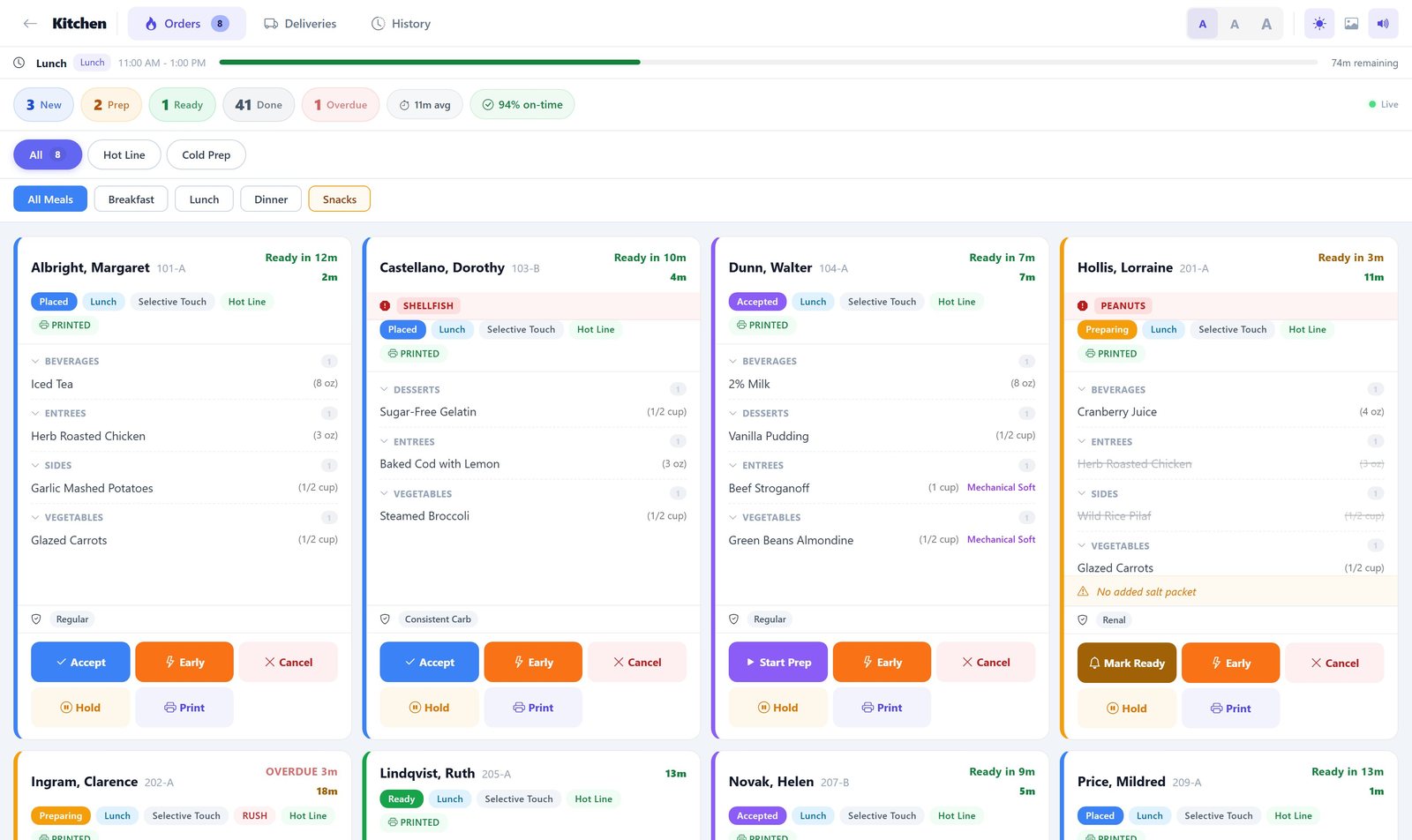
Timers that mean something
Each card counts down to its target time. Late trays turn red and rush orders are marked, so the right tray gets made next.
Allergies and textures on the card
An allergy shows as a red banner at the top of the card. Mechanical soft, pureed, and other textures sit next to the item they apply to.
Service window countdown
A progress bar shows how much of the meal period is left and when the cutoff hits.
Stations and meals
Filter to the hot line or cold prep, or to one meal, so each station sees only its own work.
Hold, reprint, serve early
Pause a tray while a resident is out, reprint a ticket, or mark a tray served early. Every change is recorded.
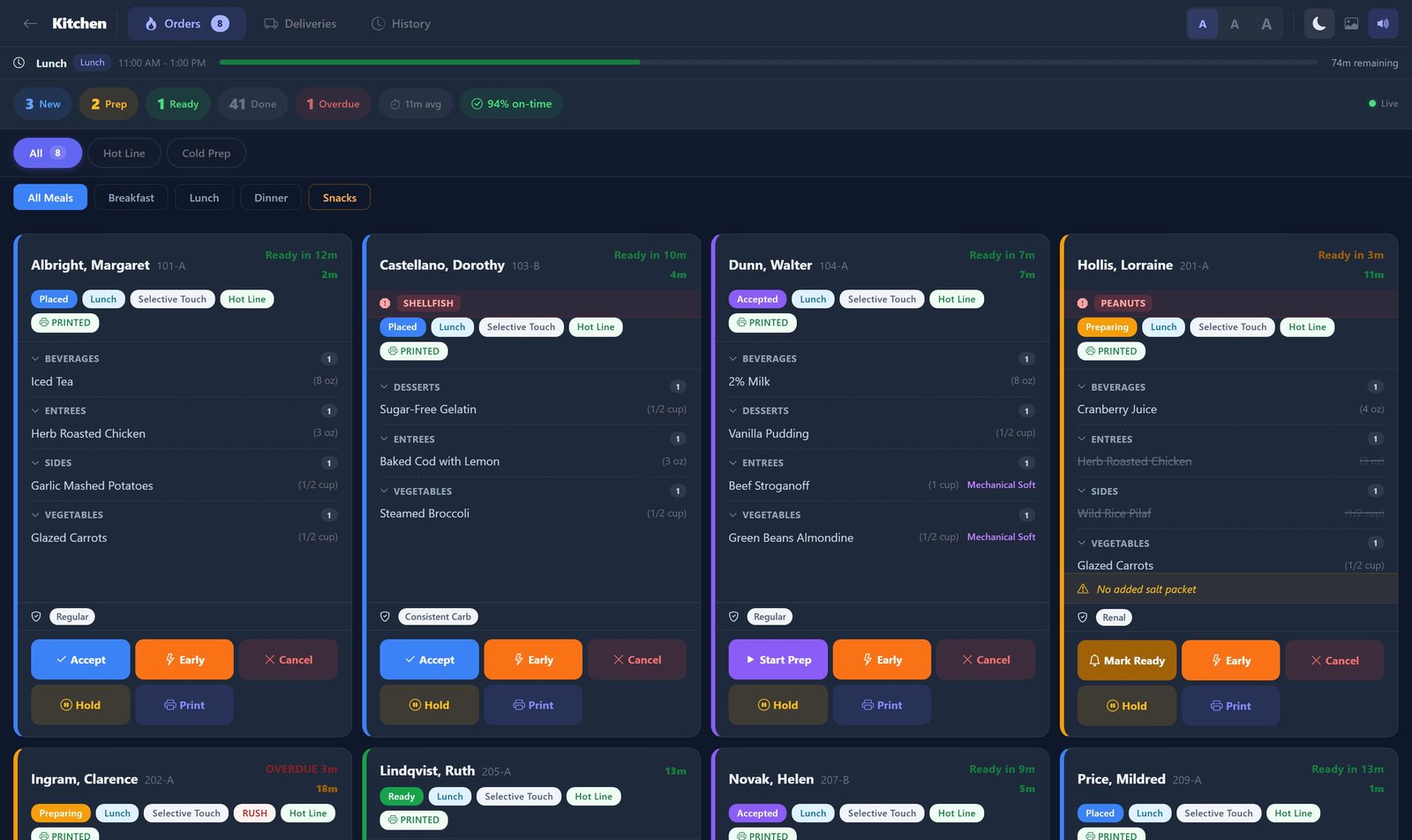
Readable across the kitchen
Switch to dark mode under bright lights, enlarge the text for a far-off screen, and turn on a chime for new and late orders.
What stays the same
- Your menu cycles, diets, textures, and residents carry over. There is nothing to re-enter.
- Tray tickets still print to your kitchen printers.
- Staff keep the same flow: pick a resident, pick the meal, tap the items, save.
- Access is still controlled per user, so each person sees only what their role allows.
Frequently asked questions
What is Selective Touch Online?
Selective Touch Online is the browser-based version of Dietech's touchscreen ordering screen. Staff pick a resident, pick the meal, tap the items, and save, the same flow as before. The difference is that it runs in a web browser on any tablet, laptop, or desktop, and every saved order goes straight to Dietech's kitchen display.
Do we have to install anything?
No. Selective Touch Online runs in a web browser. Staff sign in on devices you already own, including tablets in portrait or landscape. There is no remote desktop session to open first.
Will our menus, diets, and residents carry over?
Yes. Selective Touch Online works from the same Dietech data you use today: your menu cycles, diets, textures, residents, and allergies. There is nothing to re-enter.
Do tray tickets still print?
Yes. Tray tickets still print to your kitchen printers. The kitchen display is added alongside the ticket, not in place of it, so the line can work from the screen, the paper, or both.
What does the kitchen display add?
It shows every saved order as a card with the resident, room, items, portions, texture, and allergies, and moves each tray through placed, accepted, preparing, ready, and delivered. Timers show what is due and what is late, and the whole team sees the same board.
Related capabilities
Selective Touch
Touchscreen menu selection for dining rooms, tray lines, and cafeterias.
Kitchen Display System
Live orders, a delivery board, and two-scan patient identification at the bedside.
Allergen Management
Allergies and never-serve items enforced at the point of selection and printed on every tray ticket.
See Selective Touch Online with your own menu
We will walk through your residents, diets, and menus on a tablet and show the kitchen display alongside it, so you can judge the switch against how your kitchen actually runs.
Screens shown with sample residents and a sample menu.