When Patients Arrive Late or Diets Change After the Tickets Print
Tray tickets print before the meal. Then patients are admitted, diets change, someone goes NPO, moves rooms or is discharged. Dietech catches each change and prints a new ticket for just that tray, marked with what changed, and puts it at the top of the kitchen display, so you never reprint the whole meal.
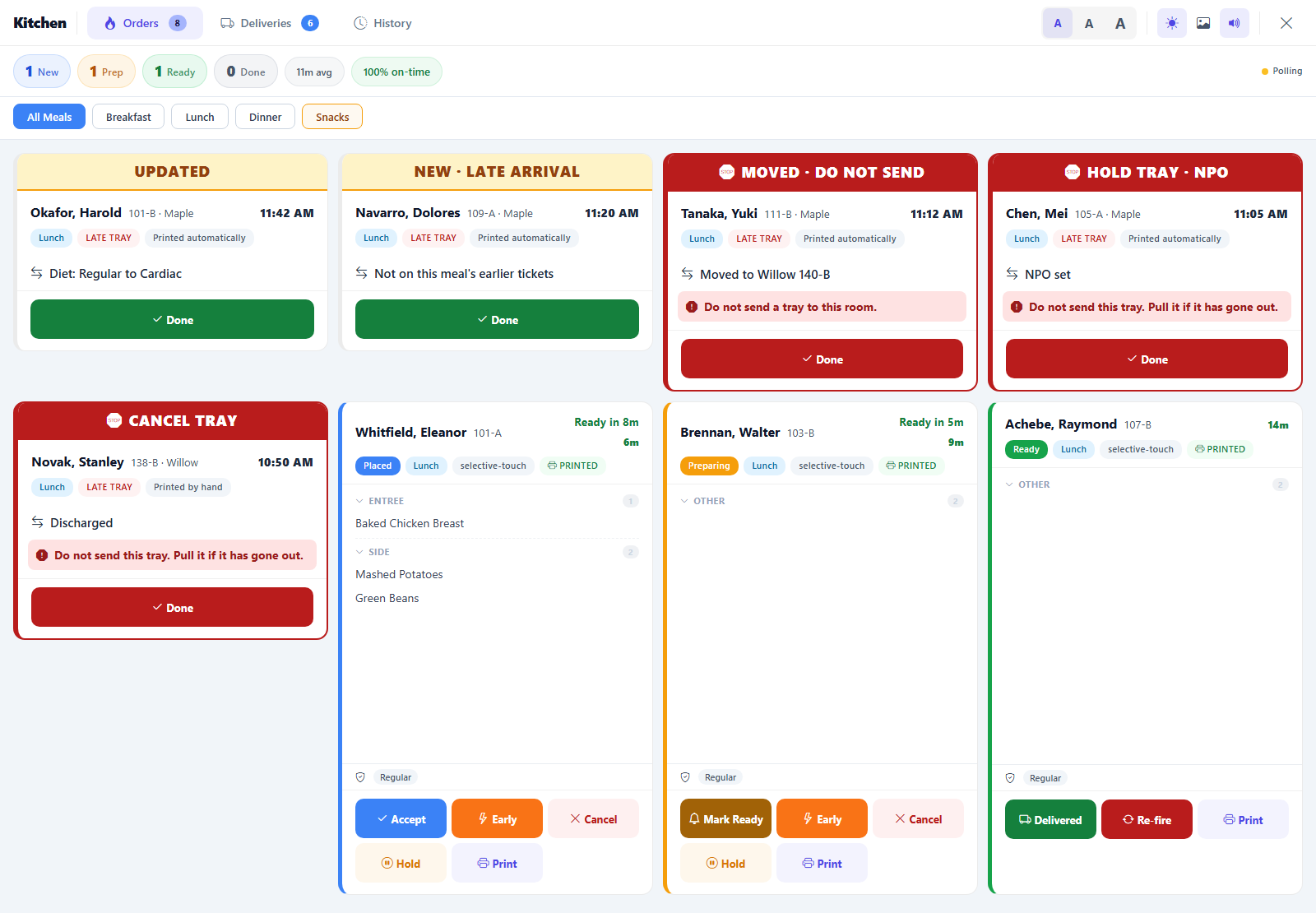
Every change says what to do
Each change ticket carries a banner across the top. Amber means a new tray to make. Red means stop.
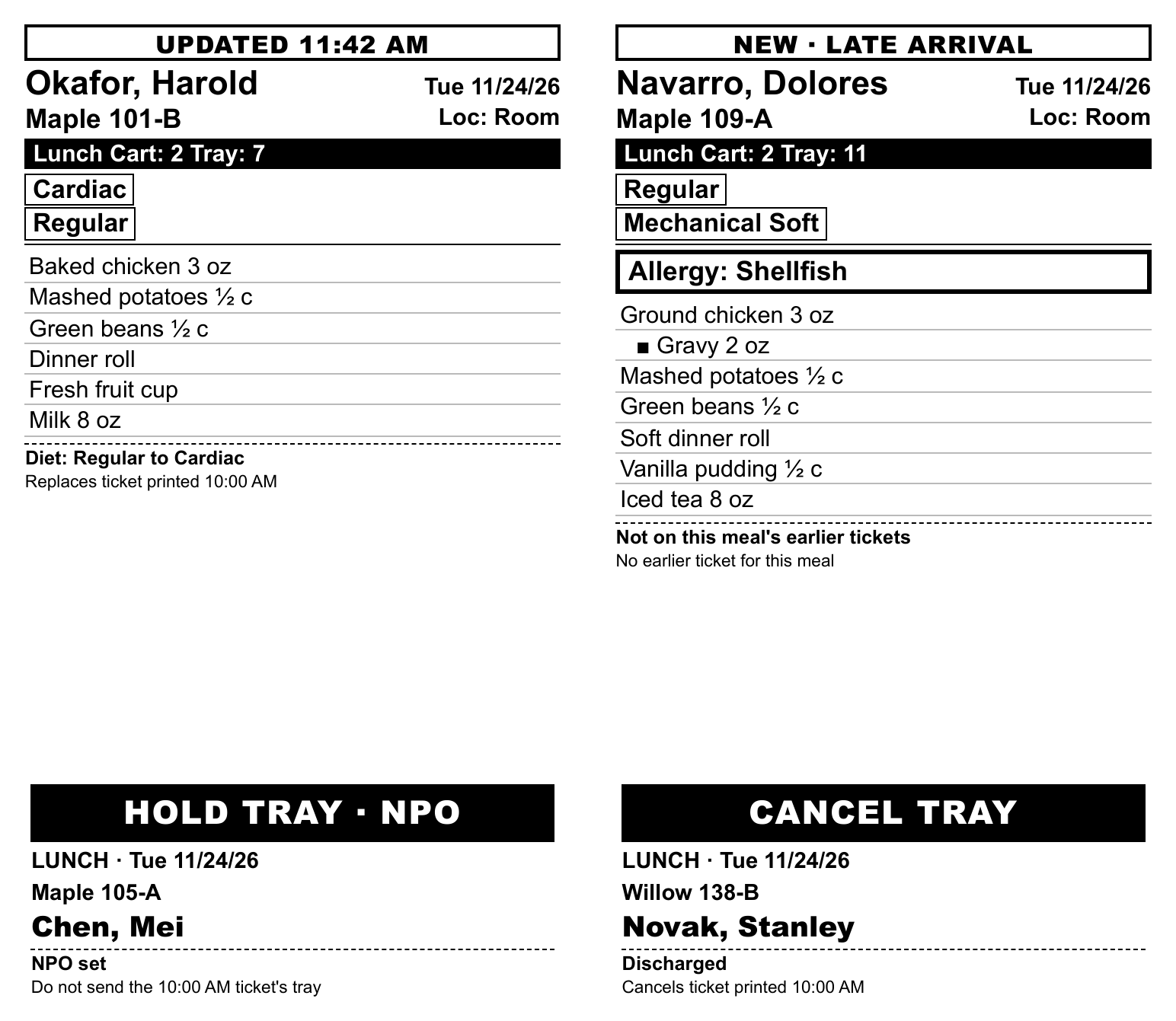
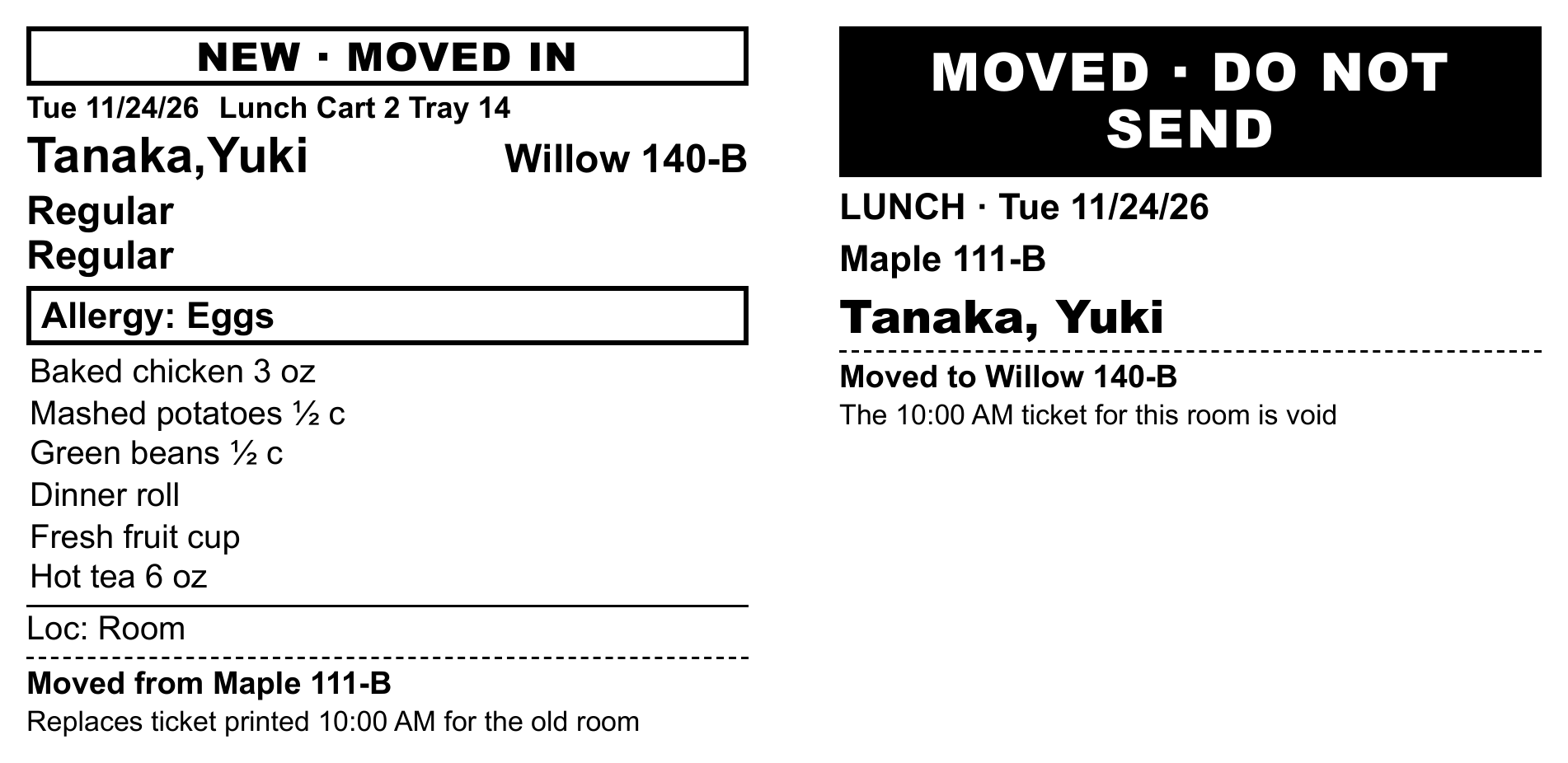
The patient's whole new ticket. The bottom says what changed (diet, texture, allergy, room or menu choice) and which ticket it replaces, so the old one comes off the tray.
A patient admitted after the meal's tickets printed gets a full ticket marked New, so a late admission still gets a tray for that meal.
A transfer prints a New ticket for the new room and a slip for the old room, so no tray goes to the bed the patient left.
When a patient goes NPO, a Hold Tray slip prints. The tray is not sent, and is pulled back if it has already gone out.
A discharge before the meal prints a Cancel Tray slip, so no tray goes to an empty bed.
How change tickets work
From the meal's first print until the cut-off you choose.
- 1
The meal's tickets print
Tray tickets print as usual, by hand or on a schedule. Dietech records what each patient's ticket said: diet, texture, liquids, allergies, NPO, room and the items on the tray.
- 2
Dietech watches the meal
Every two minutes, from the first print until a cut-off you choose after the meal starts, Dietech compares each patient against the ticket that printed. Changes entered in Dietech and changes received from the EHR both count.
- 3
Only the changed trays print
A patient whose tray changed gets a change ticket marked with what changed. Nobody else's ticket reprints, so the tray line never sorts through a second full set.
- 4
It goes to the kitchen printer
Change tickets print automatically to the printer set for them, or to the unit's tray ticket printer, through the Dietech Print Agent. Or choose List only and print them yourself from Tray Tickets with Changes since last print.
- 5
The kitchen sees it on screen too
Each change also shows as a Late Tray card at the top of the kitchen display and the delivery board. Red cards mean stop: do not send that tray. Done takes the card off every board.
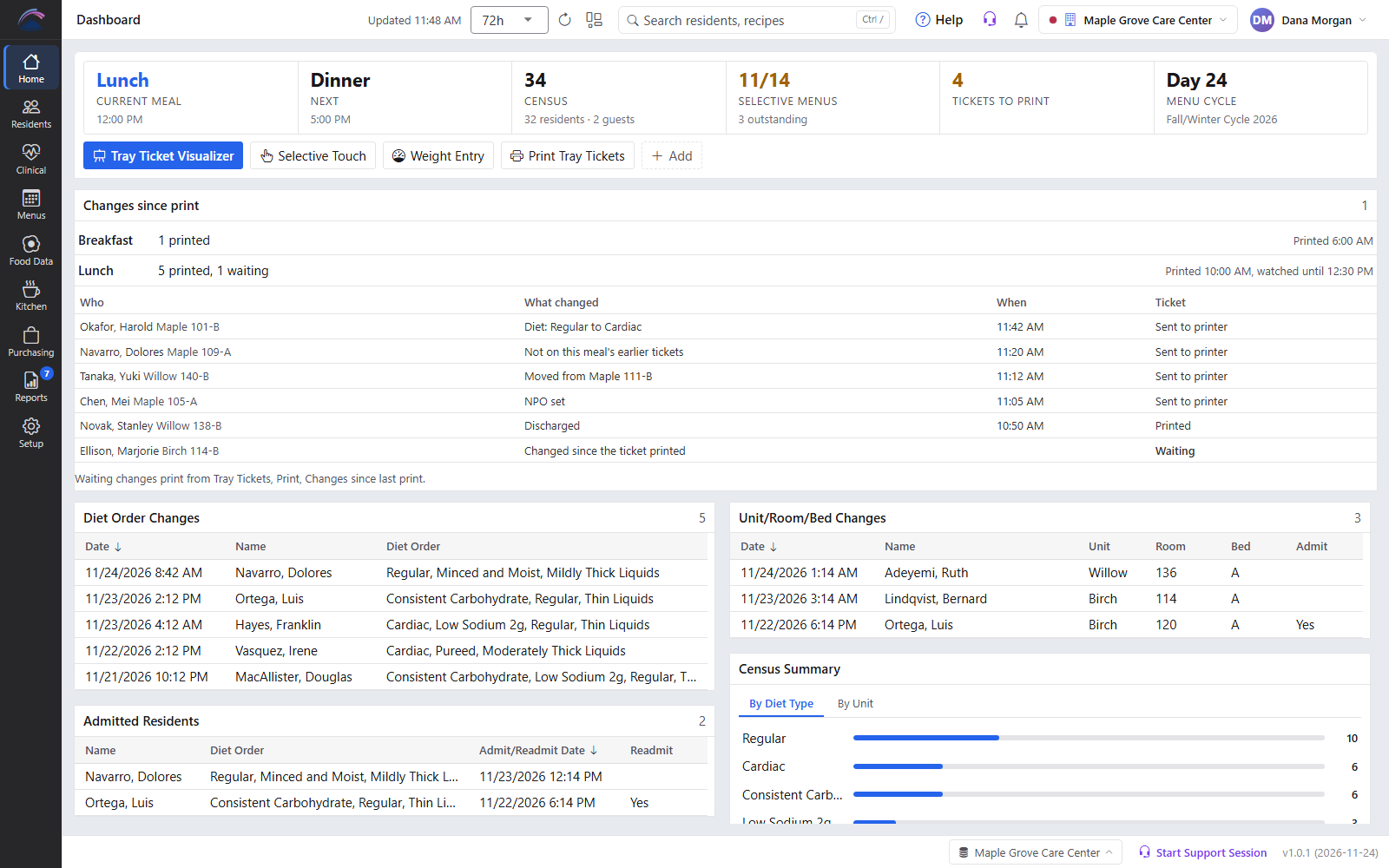
Follow every change from the dashboard
The dashboard lists each meal's changes: who, what changed, when, and whether the ticket reached the printer.
What change tickets do
Capabilities as they are implemented in Dietech today.
| Capability | How it works |
|---|---|
| What counts | Admission or transfer, diet, consistency, NPO, allergy, discharge, selective menu choice and adjustments. NPO, allergy and discharge always count, because they decide whether a tray is safe to send |
| Modes | Off, List only, or Print automatically. Off until the facility turns it on |
| Stop watching a meal | Minutes after the meal starts (60 by default, up to 240). After that, the next meal's tickets pick up the change |
| Tally receipt | Optional short receipt with each change: the items to add to the tray and the items to take off |
| Printed layout | Change tickets print in the new tray ticket layout for your paper type, with a banner across the top, even if your normal tickets use the classic layout |
| Dashboard | Changes since print, one line per meal: how many printed, how many are waiting, and how long the meal is watched. Open a meal to see who, what changed, when, and whether the ticket reached the printer |
| Kitchen display | Late Tray cards ahead of the other orders on Kitchen Display and the Delivery Board, with Done and Undo |
| Printing by hand | Reports, Tray Tickets, Print: Changes since last print prints only the patients whose ticket changed |
| Record | Every print is recorded for each patient and meal, so Dietech compares against the ticket that actually printed, not against what it expects |
Frequently asked questions
Late arrivals, diet changes and what the kitchen sees.
What is a change ticket?
A change ticket is a new tray ticket, or a short slip, that prints for one patient when something about their tray changes after the meal's tickets have already printed. It carries a banner saying what kind of change it is (Updated, New, Moved, Hold Tray or Cancel Tray), what changed, and which earlier ticket it replaces or cancels.
Why do hospitals need this?
Hospital tray tickets usually print well before the trays go out. In that gap patients are admitted, transferred, made NPO for a procedure, have their diet advanced or are discharged. Without change tickets the kitchen either reprints the whole meal or relies on phone calls and handwritten notes. Change tickets print only what changed, marked so the tray line knows what to do.
Does it work with diet orders from our EHR?
Yes. Diet orders, NPO, allergies, admissions, transfers and discharges received from the EHR over HL7 or FHIR update the patient in Dietech, and the change watch treats them the same as changes entered by hand.
What does the kitchen do with a red card?
Hold Tray, Cancel Tray and Moved cards are red and mean stop: do not send that tray, or bring it back if it has gone out. When it is handled, press Done and the card comes off every board. Undo puts it back if Done was pressed by mistake.
Is it on for every facility?
No. Change tickets are off until a facility turns them on in Facility Settings, where it chooses Print automatically or List only, how long each meal is watched, and which changes count. PSI support helps choose the settings.
Does it work for nursing homes?
Yes. It was designed for hospitals, where admissions, NPO orders and diet changes between the print and the meal are routine, but any facility can turn it on.
See change tickets with your own tray line
We will walk through a meal with your units and printers: a late admission, a diet change, an NPO and a discharge after the tickets print.