Know Exactly How Many to Make, in Every Size and Texture
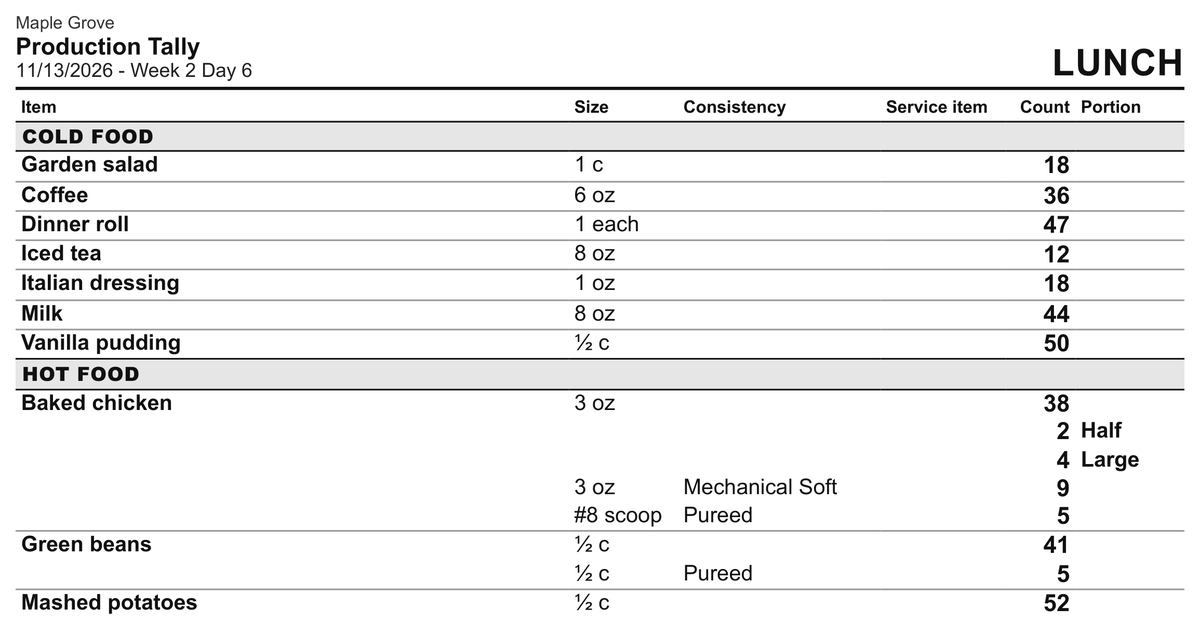
Dietech's production tally counts how many of each menu item the kitchen needs for a meal, split by portion size and texture, from the same diet orders and menus that print the tray tickets. Print it for the whole meal or by unit, in the new large-print layout or the classic one.
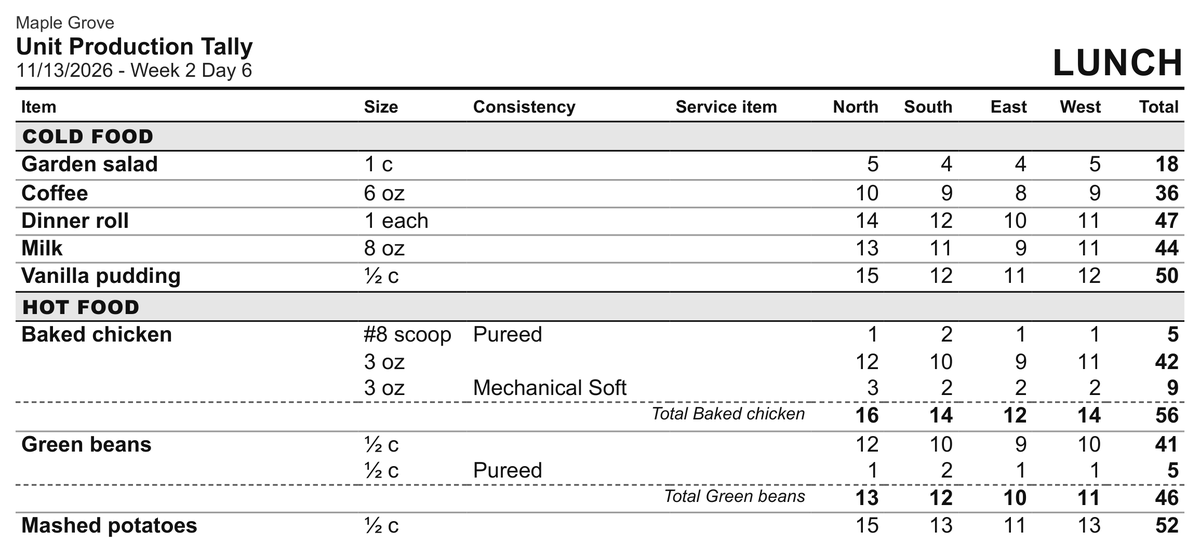
By unit, with totals
Printed from Dietech for a sample facility with four units.
How the counts are built
- 1
Counts come from the residents, not an estimate
The tally reads each resident's diet order, texture, selective menu choices, standing orders and adjustments for the meal, the same data that prints their tray ticket.
- 2
Each item is split by size and texture
Baked chicken for regular, mechanical soft and pureed diets becomes three lines with their own portion and count, plus a total for the item.
- 3
Portions add up exactly
Half, third and large portions are added as exact amounts and rounded up once for the item, so three third-portions count as one serving rather than three.
- 4
The kitchen reads it by area or by unit
Print a Summary for the whole meal, or By Unit with a column per unit or floor, filtered to a production area, food group or cart.
What the production tally does
Capabilities as they are implemented in Dietech today.
| Capability | How it works |
|---|---|
| Report types | Summary, By Unit or Floor, Combined, By Cart, and Extended |
| New layout | Summary and By Unit print in a large-print layout: items grouped by menu category, a large count for each size and texture, and a total line for items made more than one way. The classic layout stays available |
| Days and meals | One meal or several, one day or several days, including nourishment times |
| Filters | All residents, specific carts, units or residents, saved filters, food groups and production areas, and selective menu choices only |
| Each cart on its own pages | Pick several carts and print one report with a section per cart; the cart list shows how many residents are on each cart |
| Kitchen detail | Notes, garnish, special devices, food storage, service items and utensils can print with each item |
| Recipes | The tally can print the recipe cards for its items, each with the recipe's allergens |
| Late changes | With change tickets on, a tally receipt prints with each change: the items to add to the tray and the items to take off |
| Scheduled | The tally can be made at set times with the meal's tray tickets, ready in the Print Queue |
Frequently asked questions
What is a production tally?
A production tally is the kitchen's count of how many portions of each menu item to prepare for a meal. A useful one splits each item by portion size and texture, because a regular, a mechanical soft and a pureed serving of the same entree are made differently. Dietech builds the tally from each resident's current diet order and menu, so it matches the tray tickets.
How is it different from counting census by diet?
A census count tells you how many residents are on each diet. The tally goes a step further and turns that into items: it applies the menu cycle, each resident's selections, standing orders and substitutions, and counts the actual servings by size and texture.
Can it count by unit or cart?
Yes. By Unit prints a column per unit or floor with a total, and the cart options print one cart or several carts each on their own pages, so each station or cart line works from its own count.
Do we have to use the new layout?
No. The classic layouts remain available. The new layout is a check box on the report for Summary and By Unit, so you can print both and compare.
See a tally built from your own menu
We will run your menu cycle and diets through Dietech and print the tally your kitchen would work from.